
If you’ve spent any time shopping for a VPS, you’ve probably noticed something strange: two plans can list almost identical specs — same RAM, same vCPU count, same “SSD storage” — and cost wildly different amounts. Or worse, they cost the same and perform nothing alike once you actually put a website or app on them.
That’s because a spec sheet only tells you what a provider is promising, not what you’re actually going to get. A “1 vCPU” on one host might be a full dedicated core; on another, it’s a sliver of a core shared with a dozen other tenants who all happen to spike their CPU usage at the same time your Black Friday sale goes live.
A VPS (Virtual Private Server) is a slice of a physical server that’s virtualized to act like its own independent machine — you get dedicated RAM and storage allocations, root access, and isolation from other users, without paying for an entire physical server. It sits between shared hosting (cheap, but you’re at the mercy of your noisy neighbors) and a dedicated server (all the power, all the cost).
This VPS Comparison 2026 skips the marketing copy and focuses on three things leave out: what these plans actually cost after the first renewal, how they perform once you’re pushing real traffic, and which one fits your specific situation — whether that’s a solo developer’s side project or an agency juggling twenty client sites.
What Is a VPS? A Key Part of Our VPS Comparison 2026
The terminology around virtual servers gets muddy fast, so let’s clear it up before comparing anything.
VPS Comparison: VPS vs Shared Hosting
Shared hosting puts your site on a server with hundreds of other accounts, all fighting over the same CPU and RAM pool. It’s cheap because you’re sharing everything, including the risk that one bad neighbor slows the whole box down.
VPS virtualizes that same physical server, but each user gets a guaranteed slice — a fixed amount of RAM and storage that’s yours, even if another VPS on the same hardware is under heavy load. You typically get root access, meaning you can install anything you want and configure the server exactly how you need it.
VPS Comparison: VPS vs VDS and Dedicated Servers
VDS (Virtual Dedicated Server) is mostly a marketing distinction at this point — some providers use it to signal “more guaranteed, less oversold” than their standard VPS tier, but the underlying technology is usually the same virtualization approach.
Dedicated server means the entire physical machine is yours. No virtualization, no sharing, maximum performance — and a price tag to match. Makes sense for high-traffic sites, compliance-heavy workloads, or anyone who’s outgrown what a VPS can handle.
VPS Comparison: VPS vs Cloud VPS
Cloud VPS instances (think AWS EC2 or a DigitalOcean Droplet) are conceptually similar to a VPS but built for elastic, pay-by-the-hour scaling and tight integration with a broader cloud ecosystem — object storage, load balancers, managed databases. You’ll usually pay a premium for that flexibility compared to a traditional VPS provider.
If you’re a small business running a WordPress site or a developer hosting a Node app, a standard VPS is almost always the right starting point. Save dedicated servers and full cloud platforms for when you actually hit their limits.
How We Compared These VPS Plans: Our VPS Comparison
How We Evaluated This VPS Comparison 2026
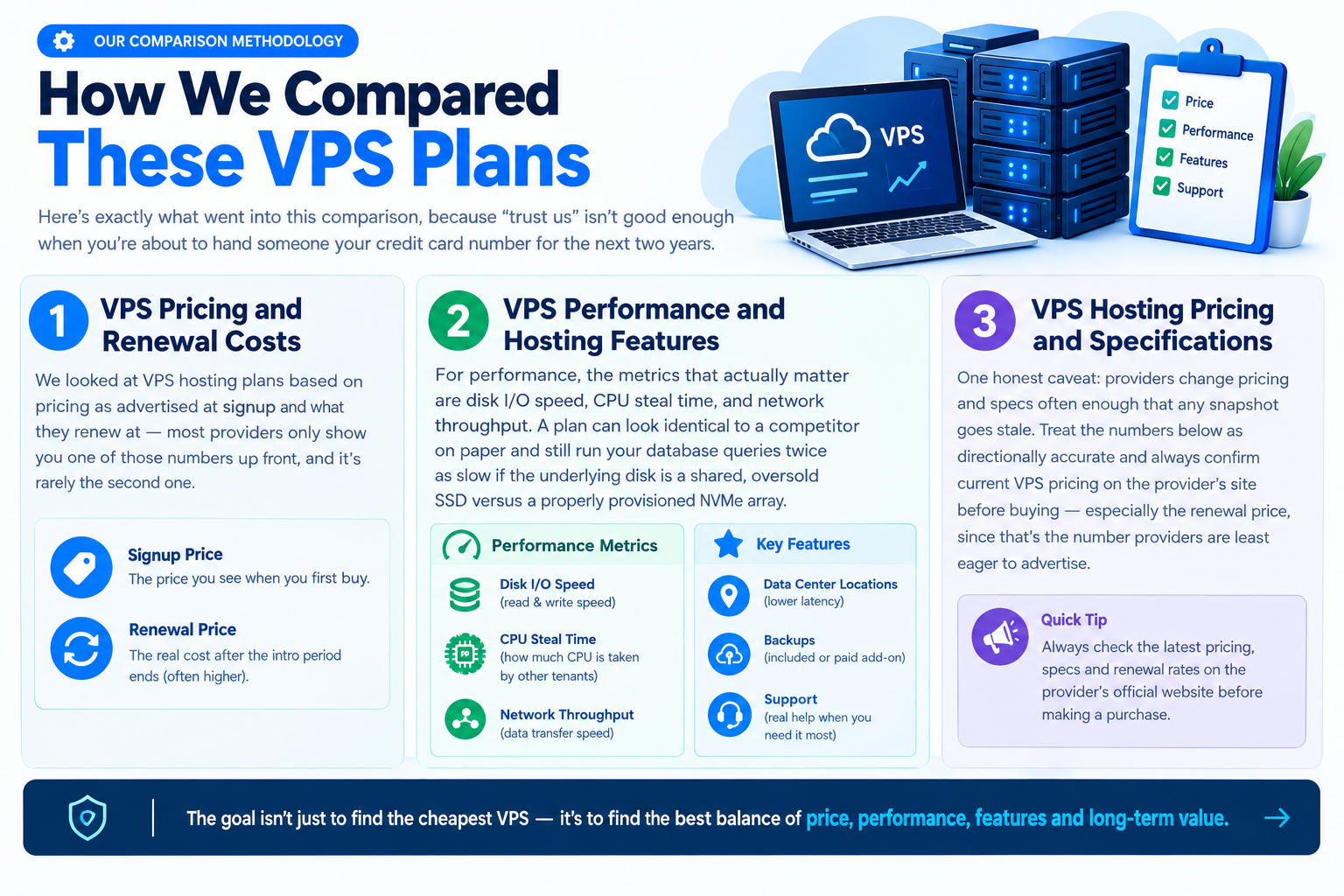
Here’s exactly what went into this VPS Comparison 2026, because “trust us” isn’t good enough when you’re about to hand someone your credit card number for the next two years.
VPS Comparison: Pricing and Renewal Costs
We looked at VPS hosting plans based on pricing as advertised at signup and what they renew at — most providers only show you one of those numbers up front, and it’s rarely the second one.
VPS Comparison: Performance and Hosting Features
For performance, the metrics that actually matter are disk I/O speed, CPU steal time, and network throughput. A plan can look identical to a competitor on paper and still run your database queries twice as slow if the underlying disk is a shared, oversold SSD versus a properly provisioned NVMe array.
We also factored in the practical details: data center locations, whether backups are included or a paid add-on, and what support actually looks like when you open a ticket at 2 a.m. because your site is down.
VPS Hosting Pricing and Specifications
One honest caveat: providers change pricing and specs often enough that any snapshot goes stale. Treat the numbers below as directionally accurate and always confirm current VPS pricing on the provider’s site before buying — especially the renewal price, since that’s the number providers are least eager to advertise.
VPS Comparison Table — Specs, Real Pricing, and Renewal Costs
| Provider | Entry Price | Typical Renewal | RAM | vCPU | Storage | Managed? | Best For |
| Vultr | $2.50–$3.50/mo | Same (hourly/monthly billing, no contract trap) | 512MB–1GB | 1 vCPU | 10–25GB SSD | Unmanaged | Developers, hourly testing |
| InterServer | $3.00/mo | Same (price-locked for life of the plan) | 2GB | 1 vCPU | 40GB SSD / 1TB HDD option | Unmanaged | Budget shoppers who hate renewal surprises |
| Contabo | $5.28/mo | Similar, but backups are a $2/mo add-on | 8GB | 4 vCPU | 100GB SSD | Unmanaged | High RAM/storage per dollar |
| DigitalOcean | $4.00–$6.00/mo | Same base price, backups add ~20% | 512MB–1GB | 1 vCPU | 10–25GB SSD | Unmanaged (managed add-ons available) | Developers who want clean docs and an API-first workflow |
| Hostinger | $6.49/mo | Jumps significantly after the discounted 24-month term ends | 4GB | 1 vCPU | 50GB NVMe | Semi-managed | Beginners who want NVMe speed without configuring everything manually |
| IONOS | $5.00/mo | Moderate increase at renewal | 2GB | 2 vCPU | 90GB NVMe | Managed options available | Small businesses wanting EU data centers |
Why Renewal Pricing Matters
One of the most important factors in this VPS Comparison 2026 is the renewal price. The classic VPS bait is a rock-bottom introductory rate tied to a long prepaid term, often 24 months, which then renews at two or three times the price once that term is up.
This isn’t unique to any one provider — it’s a common pattern in the budget hosting tier generally. Before you commit, always find the provider’s renewal pricing page and calculate what you’d actually pay over 24 months, not just what the homepage advertises.
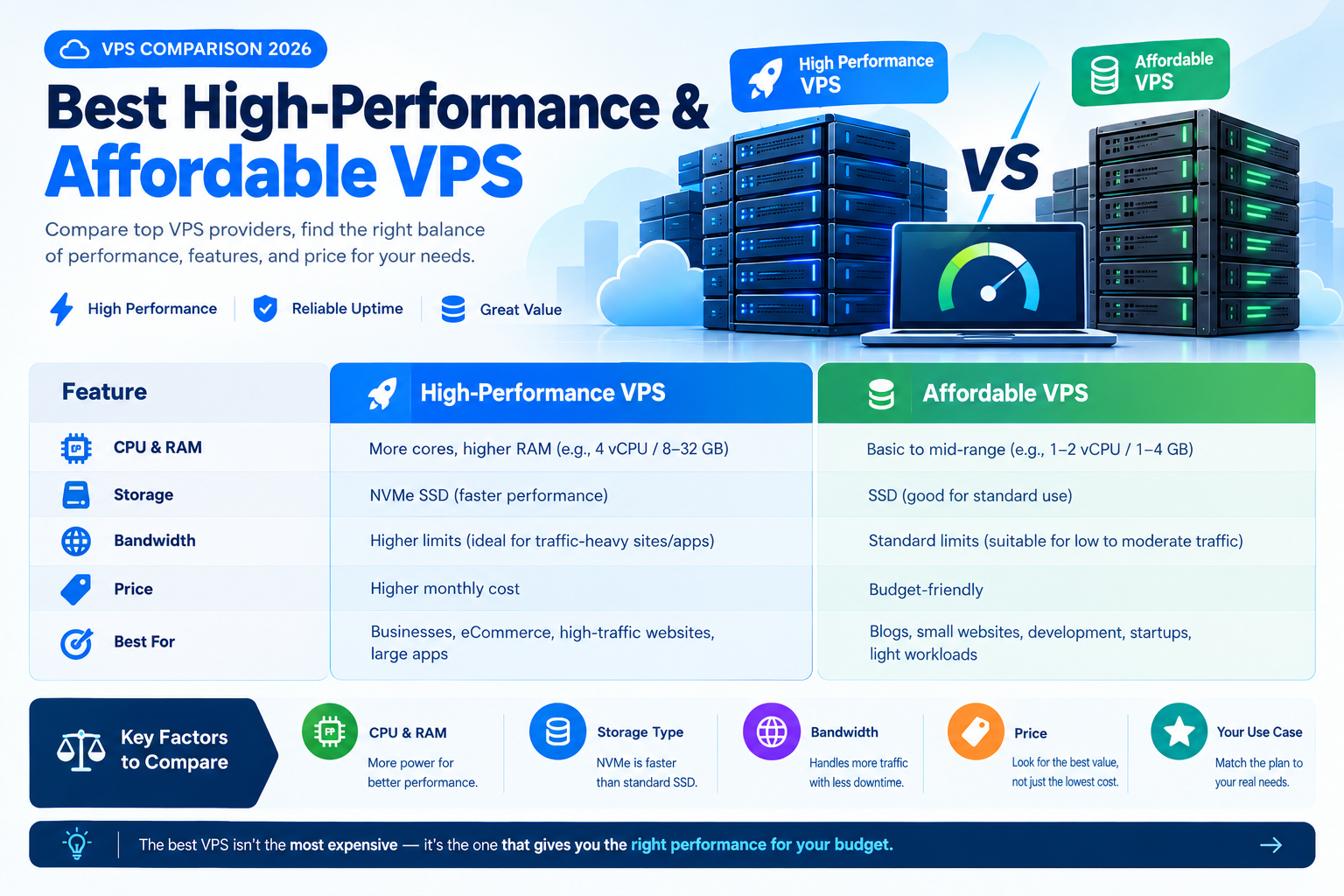
High-Performance VPS: What Performance Actually Means
In this VPS Comparison 2026, “high performance” means more than a label on a hosting page. Three things actually determine how a server performs under real load: whether your CPU cores are dedicated or shared, whether your storage is NVMe or standard SSD, and how much of your allocated resources are actually available to you at any given moment.
CPU Resources and Steal Time
That last one — CPU steal time — is the one nobody talks about, and it’s the one that bites people hardest.
Here’s a concrete example of how it plays out: imagine you buy a 2 vCPU plan and run a benchmark showing solid throughput at 2 a.m. Then at 2 p.m., when every other tenant on that same physical host is also under load, your app suddenly feels sluggish even though your dashboard still says “2 vCPU, 4GB RAM available.”
That gap between what you’re paying for and what you’re actually getting is CPU steal — and it’s invisible until you know to look for it. You can check it yourself on a Linux VPS with a simple top command; the %st (steal) value should stay close to zero on a well-provisioned host.
NVMe vs SSD Storage Performance
NVMe vs SSD storage is a simpler story: NVMe storage typically delivers several times the read/write speed of standard SATA SSDs, which matters enormously for anything doing frequent small reads and writes — a busy WordPress site with lots of plugins, a database handling concurrent transactions, or a CI/CD pipeline checking out and building code repeatedly.
If your workload is mostly serving static files, the difference is less dramatic. If it’s a database, you’ll feel it immediately.
Who Actually Needs a High-Performance VPS?
- eCommerce sites during peak traffic — a Black Friday spike is exactly when noisy-neighbor CPU steal will hurt you most.
- SaaS backends and APIs — consistent low-latency response times are part of the product experience.
- Database-heavy applications — anything running Postgres, MySQL, or MongoDB under real concurrent load benefits directly from NVMe I/O speed.
- CI/CD runners — repeated build/test cycles are disk-and-CPU intensive in short, sharp bursts.
If none of that describes your project, you’re probably fine on a standard-tier VPS, and paying extra for “high performance” specs you won’t touch is money better spent elsewhere — like backups or a CDN in front of your site.
Ready to get started? Click here to explore the VPS plan and get started today.
Affordable VPS — Getting Real Value Without the Renewal Trap
This VPS Comparison 2026 also looks at why “affordable” and “cheap” aren’t the same thing, even though hosting marketing treats them interchangeably. Cheap means the lowest number on the page today. Affordable means the best performance-per-dollar over the life of the plan — which, as covered above, is a very different calculation once VPS pricing and renewal costs enter the picture.
What to Look for in Affordable VPS Hosting
When comparing the cheapest VPS hosting plans, here’s what typically gets cut to hit an aggressively low price point: bandwidth caps that sound generous until you check the overage fees, backups that cost extra or aren’t offered at all, a single data center location (fine if your audience is local, painful if they’re not), and support that’s ticket-only with multi-hour response windows.
None of that makes budget VPS a bad choice — it just means you need to know what you’re trading away. A solo developer spinning up a side project doesn’t need enterprise support SLAs. A small local business running a brochure site doesn’t need multi-region redundancy. Matching the trade-offs to what you actually need is the whole game.
Compare VPS Costs Beyond the Signup Price
A practical example: InterServer’s entry plan holds its price for the life of the account rather than hiking at renewal — which sounds like a small thing until you compare it against a plan that looks $2 cheaper on day one but doubles at month 25. Over two years, the “more expensive” plan with flat pricing often wins on total cost. That’s the calculation worth doing before you sign up anywhere, not just here.
Start Small and Scale Your VPS
One more piece of practical advice that saves people money more often than any specific provider pick: start smaller than you think you need. Most VPS providers let you scale RAM and CPU up without data loss or major downtime, so there’s little upside to overprovisioning “just in case” on day one. Buy what today’s traffic needs, and upgrade when the metrics tell you to.
Which VPS Is Right for You? Recommendations by Use Case
VPS Recommendations by User Type
Developers and Side Projects
Prioritize root access VPS options, hourly billing so you’re not locked into a monthly commitment for something you’re still testing, and low entry cost. An unmanaged plan from a provider like Vultr or DigitalOcean fits well — you get full control and you’re probably comfortable configuring your own server anyway.
Small Businesses and Brochure Sites
Ease of use beats raw performance here. Look for a managed or semi-managed plan with backups included, since you likely don’t have (or want) the in-house skill to handle server maintenance yourself. A plan in the $5–7/mo range with a control panel and included backups is usually the sweet spot.
Startups Scaling an App or SaaS Product
You want dedicated-core performance and the ability to scale vertically without downtime as your user base grows unpredictably. This is where paying for the “high performance” tier actually earns its keep — inconsistent performance during a growth spurt costs you customers, not just money.
eCommerce Owners
Uptime and traffic-spike handling are non-negotiable — a slow or down store during a sale is directly lost revenue. Check for CDN compatibility, a real uptime SLA (not just a marketing claim), and enough headroom in RAM/CPU to handle seasonal spikes without a manual upgrade scramble.
Agencies Managing Multiple Client Sites
Look specifically for multi-server management tooling, white-label or reseller options, and resource isolation between clients — you don’t want one client’s traffic spike degrading another client’s site on the same box. This is a case where the “cheapest per-server” math often loses to a provider with better fleet-management tools.
Common VPS Buying Mistakes to Avoid
Choosing Based on RAM and Price Alone
Two plans with “4GB RAM” can perform completely differently depending on whether the CPU is dedicated or shared and how oversold the host is. Specs are a starting filter, not the whole decision.
Ignoring Data Center Location
A server in Frankfurt serving an audience in Chicago adds real, measurable latency. Pick a location close to where your actual users are, not just the cheapest region.
Not Checking the Exit Before You Check In
Before committing, look at what it costs to leave — data egress fees, whether snapshots export cleanly, and how much downtime a migration typically involves. VPS migration should be part of your planning before you commit, not something you think about after deciding to leave.
Underestimating Support Until You Need It
Everyone assumes their server will just work — until it doesn’t, usually at an inconvenient time. If you can, test a provider’s support response time with a pre-sales question before you buy. It’s a decent proxy for what post-sales support will actually look like.
Going Unmanaged Without the Skills to Manage It
Unmanaged VPS is cheaper for a reason: you’re responsible for security patches, backups, and general server upkeep. If that’s not something you or your team can realistically keep up with, the “savings” evaporate the first time something breaks and you’re paying an emergency freelancer to fix it. Understanding managed vs unmanaged VPS is therefore an important part of choosing the right plan.
Frequently Asked Questions About VPS Hosting
What’s the Difference Between VPS and Cloud Hosting?
They’re built on similar virtualization technology, but cloud hosting (like AWS or Google Cloud) is designed for elastic, pay-as-you-go scaling and deep integration with other cloud services — object storage, managed databases, load balancers. Traditional VPS hosting is simpler and usually cheaper for a single, relatively predictable workload.
Is a High-Performance VPS Worth the Extra Cost for a Small Business?
Usually not, unless you’re running something CPU- or database-intensive, or you expect real traffic spikes (like seasonal sales). A standard-tier VPS with good uptime and enough RAM covers most small business websites just fine.
How Much RAM and CPU Do I Actually Need?
A basic WordPress site or blog runs comfortably on 1–2GB RAM. Add plugins, WooCommerce, or moderate traffic and you’re looking at 2–4GB. A Node.js or Python API backend depends heavily on concurrent request volume, but 2GB/2 vCPU is a reasonable starting point you can scale up from.
Can I Upgrade an Affordable VPS Plan Later Without Downtime?
Most providers support vertical scaling — adding RAM, CPU, or storage — with minimal or no downtime, though some require a short restart. Always confirm this with the specific provider and keep a current backup before any upgrade, just in case.
What’s a Reasonable Monthly Budget for a Startup’s First VPS?
Somewhere in the $5–15/mo range covers a solid entry-level plan with enough headroom to handle early growth. Resist the urge to overprovision on day one — scale up when your actual usage data tells you to, not before.
Is Managed or Unmanaged VPS Better for a Non-Technical Business Owner?
Managed, almost always. The extra cost buys you server maintenance, security patching, and support that actually handles server-level issues instead of just pointing you to documentation. Unmanaged only makes sense if you or someone on your team is comfortable administering a Linux server.
The Bottom Line
The right VPS isn’t the one with the biggest numbers on the pricing page — it’s the one that matches your actual workload, holds up under real traffic, and doesn’t quietly triple in price the moment your introductory term ends. Start with your use case, check the true cost over 24 months rather than the signup price, and verify performance claims (steal time, storage type) rather than taking “high performance” at face value. Get those three things right, and the best VPS provider for your needs matters a lot less than most VPS comparison pages want you to believe.
Not sure which tier fits your workload? Compare current VPS plans side-by-side →