
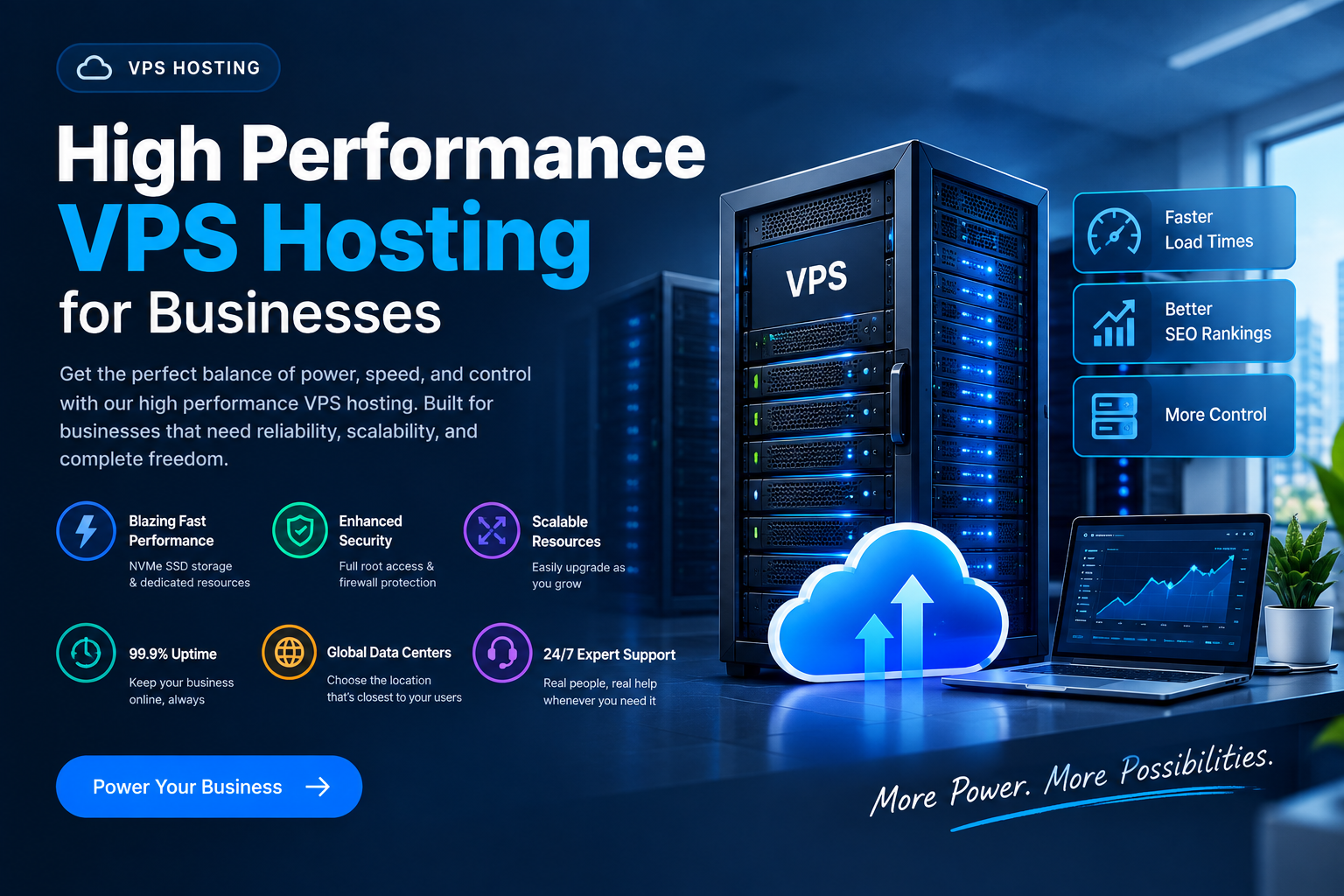
If you’ve spent any time searching for a high performance VPS, you’ve probably noticed the same thing everywhere: NVMe this, dedicated that, 99.9% uptime, “blazing fast” speeds. After a while, all those promises start to sound pretty similar.
The tricky part is figuring out what actually makes one VPS faster and more reliable than another. A plan can look great on a pricing page and still struggle when your website gets busy, your database starts working harder, or several applications are running at the same time.
That’s why this guide takes a practical approach. Instead of looking only at advertised specifications, we’ll break down what affects VPS performance in real-world use, how to compare plans without overpaying, and what developers, startups, eCommerce stores, agencies, and small businesses should actually look for.
We’ll also cover simple ways to test a VPS yourself, because specifications tell only part of the story. The underlying hardware, resource allocation, storage performance, network quality, and server management can all make a noticeable difference.
What Is a High Performance VPS?
A VPS, or virtual private server, sits between shared hosting and a dedicated server. On shared hosting, you’re splitting resources with potentially hundreds of other websites. If another website suddenly gets a huge traffic spike, your site can sometimes feel the effects.
A dedicated server gives you an entire physical machine, which provides plenty of power and control but can be more infrastructure than a smaller project actually needs.
How Does a VPS Work?
A VPS takes a middle-ground approach. Virtualization divides a physical server into separate virtual environments, giving each VPS its own allocated resources, operating system, and administrative access.
You get much of the flexibility of a dedicated server without paying for an entire physical machine.
VPS vs Dedicated Hosting and Cloud Hosting
If you’re deciding between different infrastructure options, understanding the difference between VPS and dedicated hosting can help you work out which setup makes sense for your project.
It’s also worth clearing up something else: cloud hosting vs VPS isn’t simply a question of which one is “faster.” A VPS can run on cloud infrastructure, but performance still comes down to the actual hardware, resource allocation, storage, network, and virtualization technology behind it.
So what makes a VPS genuinely high performance?
High Performance VPS: CPU Allocation
CPU allocation is one of the first things to investigate. A plan advertising four vCPUs doesn’t necessarily mean you’ll receive the same level of CPU performance as another four-vCPU plan.
Some providers use dedicated CPU resources, while others allow VPS instances to share physical CPU capacity. Shared or burstable CPU can work perfectly well for lighter workloads, but applications with consistent processing requirements may benefit from guaranteed resources.
That’s why dedicated vCPU is worth looking for when predictable performance matters.
High Performance VPS: Storage Type
Storage can have a surprisingly large impact on a VPS.
Traditional hard drives have largely disappeared from modern VPS infrastructure, while SATA SSDs became the standard for many hosting environments. NVMe SSDs take things further by connecting through PCIe, allowing much higher throughput and lower latency.
NVMe SSD Hosting
For applications that frequently read and write data — especially databases, dynamic websites, and web applications — NVMe SSD hosting can provide a meaningful performance advantage.
Don’t stop at the word “NVMe,” though. If a provider publishes IOPS or read/write benchmarks, take a look at them. Actual performance information is much more useful than a generic “fast storage” claim.
High Performance VPS: Virtualization
The virtualization platform also matters.
KVM (Kernel-based Virtual Machine) provides a more complete virtual machine environment, including its own kernel and strong separation between instances. This makes it a popular choice for users who want more control over their server environment.
Older virtualization technologies may offer fewer options or weaker isolation, so it’s worth checking what technology is actually being used.
Network Bandwidth and Speed
A fast CPU won’t compensate for a poor network connection.
Look at the advertised port speed, bandwidth limits, traffic policies, and data center location. A VPS with a 1 Gbps network port can be a very different proposition from one limited to 100 Mbps, particularly for media-heavy websites, APIs, downloads, or busy online stores.
Why Network Latency Matters
Latency matters too. A server located close to your main audience will usually provide a better network experience than an equally powerful server located on the other side of the world.
What to Check Before Buying
Here’s a simple rule: if a provider talks endlessly about “blazing speed” but doesn’t clearly explain CPU allocation, storage, virtualization, or VPS bandwidth and network speed, ask questions before buying.
High Performance VPS vs. Affordable VPS — Do You Have to Choose?
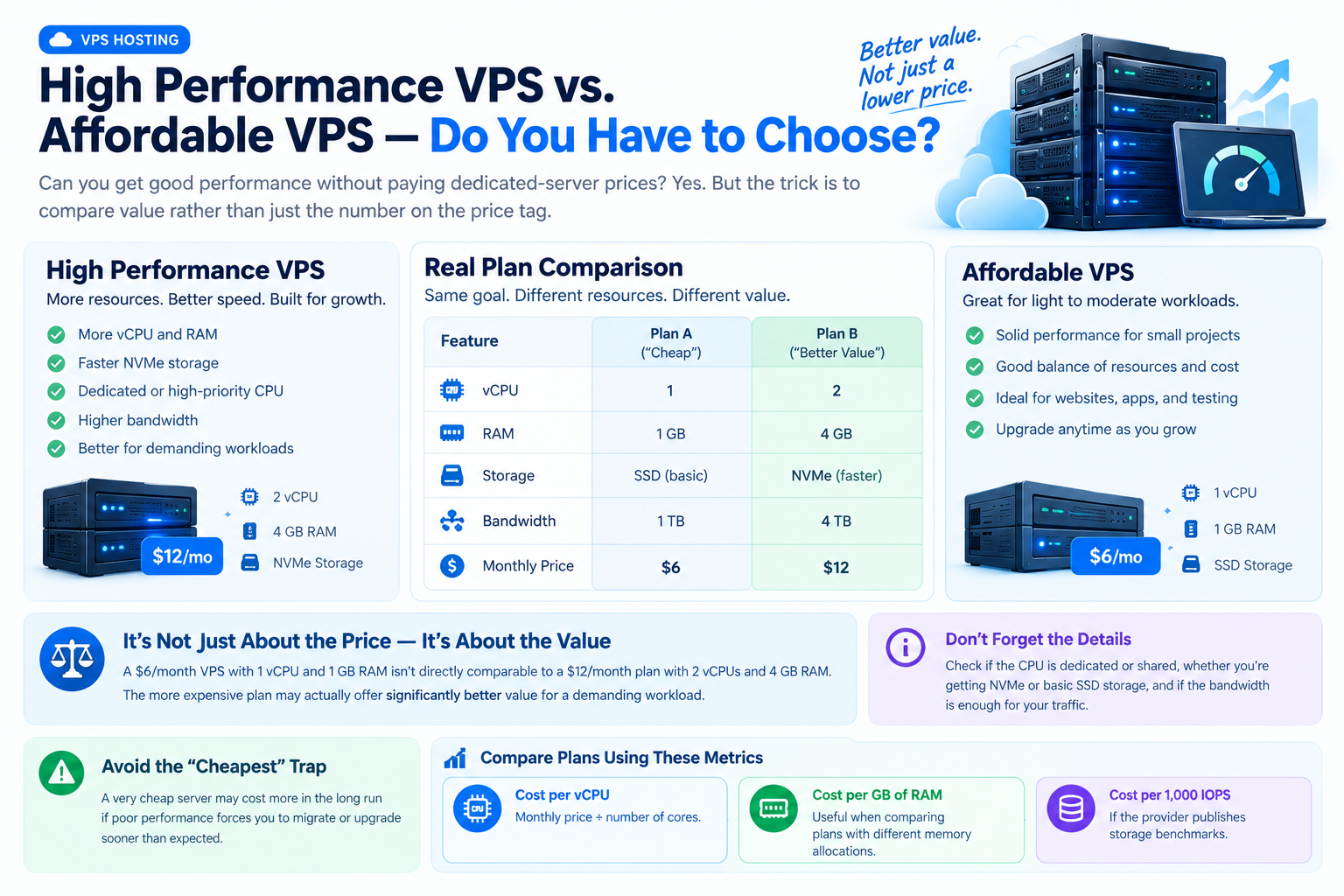
This is probably the question behind most hosting searches: Can I get good performance without paying dedicated-server prices?
Yes. But the trick is to compare value rather than just the number on the price tag.
A $6/month VPS with 1 vCPU and 1 GB RAM isn’t directly comparable to a $12/month plan with 2 vCPUs and 4 GB RAM. The more expensive plan may actually offer significantly better value for a demanding workload.
The same applies to storage and networking. You need to know whether your CPU is dedicated or shared, whether you’re getting NVMe or basic SSD storage, and whether bandwidth is sufficient for your traffic.
If you’re searching for cheap VPS hosting, don’t automatically assume the lowest price is the best deal. A very cheap server may cost more in the long run if poor performance forces you to migrate or upgrade sooner than expected.
A useful way to compare plans is to look at:
- Cost per vCPU — monthly price divided by the number of cores.
- Cost per GB of RAM — useful when comparing plans with different memory allocations.
- Cost per 1,000 IOPS — if the provider publishes storage benchmarks.
- Bandwidth allowance — especially important for media-heavy or high-traffic websites.
- Upgrade costs — a cheap starting plan isn’t as attractive if the next tier is dramatically more expensive.
The goal isn’t to find the cheapest VPS. It’s to find the least expensive setup that comfortably handles your actual workload.
A developer running a few side projects probably doesn’t need 32 GB of RAM. On the other hand, an online store shouldn’t cut resources so aggressively that the server struggles during its busiest sales period.
Key Features to Look for in a High Performance VPS Provider
When comparing providers, it’s easy to get distracted by promotional language. Instead, focus on the specifications and policies you can actually verify.
This is the checklist that separates a genuinely high performance VPS from one that simply uses the phrase in its marketing.
NVMe Storage
Look for NVMe storage and, where available, published IOPS or benchmark information.
“SSD-powered” doesn’t tell you enough. Knowing what kind of SSD is being used and how the storage performs under real workloads gives you a much clearer picture.
Dedicated CPU Resources
If performance consistency matters, check whether CPU cores are dedicated or shared.
An advertised “up to 4 vCPUs” plan can behave differently from a plan with guaranteed CPU resources. Ask the provider what portion of the advertised CPU allocation is actually guaranteed.
High-Speed Network
Check the port speed and bandwidth policy.
A 1 Gbps port doesn’t necessarily mean you’ll continuously transfer data at 1 Gbps, but it gives you considerably more headroom than a 100 Mbps connection when traffic increases.
VPS Uptime SLA
A VPS uptime SLA tells you what level of availability the provider commits to.
For context, 99.9% uptime allows roughly 8.7 hours of downtime over a year, while 99.99% allows roughly 52 minutes.
Those numbers may look close on paper, but the difference can matter considerably for an online store or application where downtime directly affects customers.
Root Access
A root access VPS gives experienced users much more control over the server.
You can install software, configure services, manage firewall rules, change server settings, and build the environment around your application.
DDoS Protection
DDoS protection is another feature worth checking before signing up. Ideally, basic protection should be clearly explained rather than appearing as an unexpected paid add-on.
Easy Scaling
Your hosting requirements won’t necessarily stay the same.
A good provider should make it reasonably straightforward to increase CPU, RAM, or storage as your workload grows. Ideally, you shouldn’t have to rebuild your entire environment just because you need more resources.
Data Center Location
Choose a server location that makes sense for your audience.
A powerful VPS in Frankfurt won’t eliminate latency for an audience primarily located in the United States. Likewise, a server in Singapore may not be the best choice for visitors concentrated in Europe.
Human Support
Technical problems don’t always happen during business hours.
For managed hosting customers especially, having access to someone who can actually investigate a server issue can be far more useful than being sent through an endless chatbot loop.
How to Benchmark and Test VPS Performance Yourself
One of the best ways to evaluate a VPS is to test it yourself.
Hosting specifications are useful, but two servers with similar specifications can perform differently depending on the underlying hardware, storage configuration, resource contention, and network setup.
If a provider offers a trial period or money-back window, use it to run a few basic tests before making a long-term commitment.
Test Disk Performance With fio
sudo apt install fio
fio –name=randwrite –ioengine=libaio –iodepth=1 –rw=randwrite –bs=4k –direct=1 –size=512M –numjobs=1 –runtime=60 –group_reporting
This gives you an idea of random disk performance. Random I/O is particularly relevant for databases and dynamic applications because those workloads constantly read and write smaller pieces of data.
Test CPU Performance With sysbench
sudo apt install sysbench
sysbench cpu –cpu-max-prime=20000 run
Run the test several times rather than relying on one result.
If performance varies dramatically between tests, especially when running them at different times of day, it may be worth investigating whether CPU contention or other resource limitations are involved.
Test Network Performance
You can use tools such as iperf3 or speedtest-cli.
pip install speedtest-cli
speedtest-cli
This can give you a quick indication of download and upload performance and can help you spot obvious network limitations.
Don’t Test Only Once
This is an important part of practical VPS testing.
Run benchmarks at different times — including during busier periods. A server that performs well at 3 a.m. may behave differently when other users on the infrastructure are active.
And remember that benchmarks aren’t everything. If you’re hosting WordPress, a Node.js application, a database, or Docker containers, test the actual workload too.
A VPS that scores well in a synthetic benchmark isn’t automatically the best server for your specific application.
High Performance VPS for Developers — What to Prioritize
If you’re looking for the right VPS for developers, your priorities are usually different from someone hosting a simple brochure website.
Start with full root access. Developers shouldn’t have to contact support every time they need to install a package, configure a service, or change a server setting.
Docker and Kubernetes support can also be important if you’re building containerized applications. Check the provider’s networking and storage setup before assuming every environment will work equally well with container orchestration.
Linux VPS hosting is another popular option for developers because Linux supports a wide range of development tools, server applications, and runtimes.
Make sure the provider supports the technologies you actually use, whether that’s Node.js, Python, PHP, Go, PostgreSQL, MySQL, or another part of your stack.
Backups and Snapshots
Backups are easy to overlook when everything is working.
They’re much more important when a deployment goes wrong.
Snapshots can give you a convenient rollback point before a major change, while automated backup options can provide additional protection against data loss.
Don’t assume a snapshot and a backup are the same thing. Check how backups are stored, how frequently they run, how long they’re retained, and how restoration works.
API Access
API access can be particularly useful for developers managing infrastructure programmatically.
You may want to create temporary environments, resize servers, automate deployments, or integrate server management into a CI/CD workflow.
A provider with a useful API can save considerable manual work as your infrastructure grows.
Security Controls
Don’t overlook basic server security.
SSH key management, firewalls, security groups, regular updates, and sensible access controls are all part of running a production VPS responsibly.
A fast server isn’t much use if the environment hasn’t been secured properly.
High Performance VPS for eCommerce and Agencies
For eCommerce businesses, performance isn’t just a technical metric. It affects the experience customers have while browsing products, adding items to their cart, and completing checkout.
A busy store needs enough CPU and RAM to handle its application and database workload, while fast storage can help with database operations and other disk-intensive tasks.
For businesses running VPS for WordPress or WooCommerce, the overall setup matters just as much as the VPS itself. Caching, image optimization, a CDN, database configuration, and application-level optimization can all affect the final page speed.
This is why simply upgrading to a bigger server isn’t always the complete solution.
During a product launch or seasonal sale, however, having enough resources to handle sudden traffic increases can make a major difference.
Why Agencies Need Resource Isolation
Agencies face a different challenge.
Imagine hosting ten client websites on the same infrastructure. One client publishes a campaign that suddenly goes viral. Another installs a plugin that starts consuming excessive resources.
Without proper resource isolation, those problems can affect other websites on the same server.
That’s why agencies should pay attention to guaranteed resources, isolation, monitoring, backups, and disaster recovery.
If you’re managing several websites, compare multi-site or agency hosting plans based on the resources and management features they actually provide rather than simply looking at the number of domains included.
Common Mistakes That Undermine VPS Performance
Even excellent hardware won’t fix poor planning.
Here are some of the mistakes we see most often when people choose or manage VPS hosting.
Buying More Resources Than You Need
A WordPress site receiving a few hundred visitors a month probably doesn’t need eight vCPUs and 32 GB of RAM.
That extra money might be better spent on backups, monitoring, security, or a CDN.
Starting With Too Little
The opposite can also happen.
Choosing the cheapest plan is fine if you’re testing an idea, but problems start when traffic grows and the server doesn’t have enough CPU or memory to handle it.
Monitor your resource usage and upgrade before the server becomes a bottleneck.
Ignoring Server Location
Server location affects latency.
If most of your visitors are in the United States, choosing a server thousands of miles away simply because the price is lower may not be the best trade-off.
Skipping Monitoring
Resource usage changes over time.
Your website gains plugins, traffic increases, databases grow, and applications become more demanding.
Using server monitoring tools can help you see CPU, RAM, storage, and network usage before a small resource problem turns into a major outage.
Treating Backups as Optional
Backups aren’t exciting until you need one.
A reliable backup strategy should be part of your hosting plan from the beginning. Don’t wait until you’ve lost important files or database records to discover that your backup wasn’t working.
Signing an Annual Contract Too Early
A discount can look attractive, but it’s worth testing the provider before committing for a year.
Performance, support quality, network reliability, and actual resource allocation are much easier to judge when you’ve used the server yourself.
How to Choose the Right High Performance VPS Plan
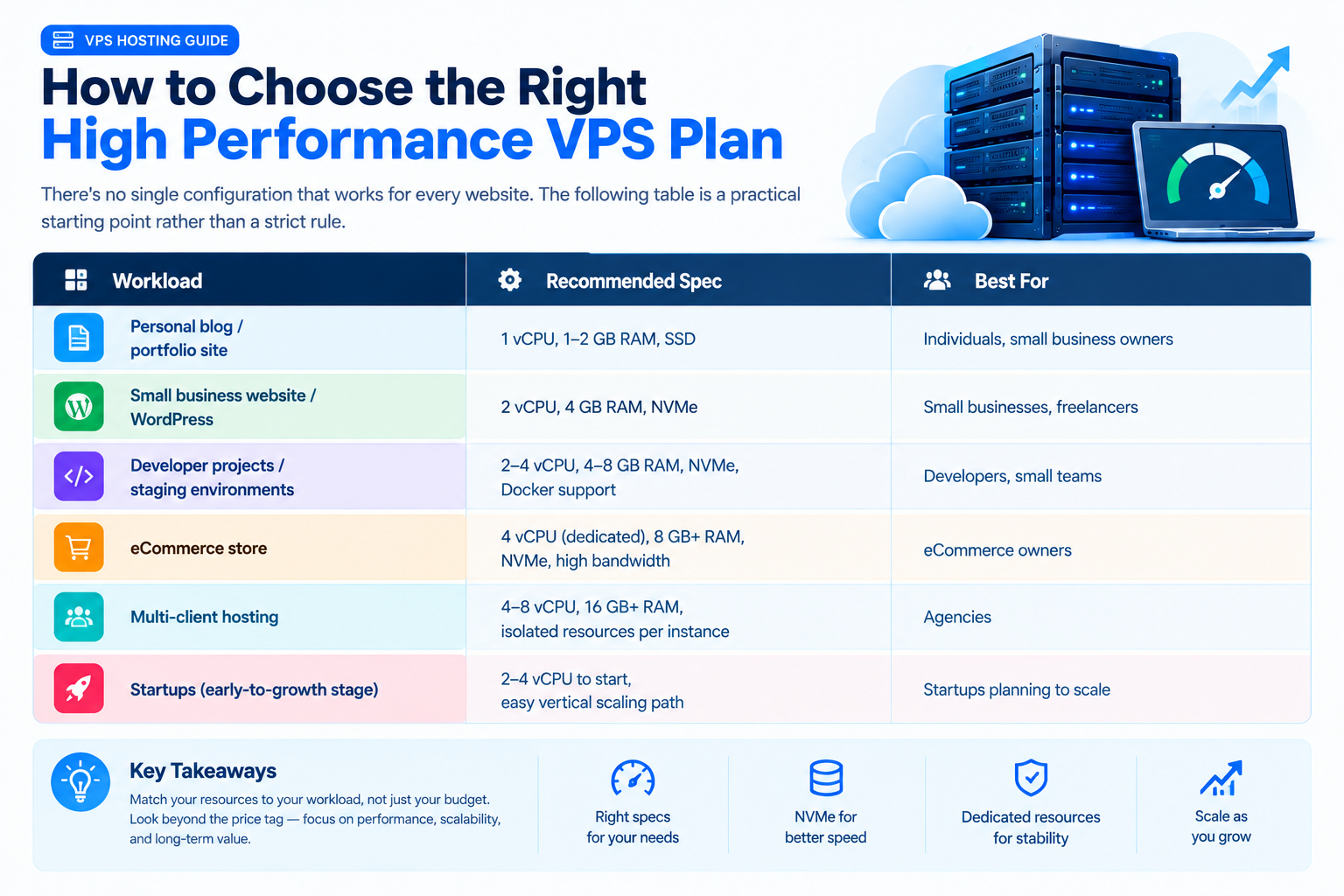
There’s no single configuration that works for every website. The following table is a practical starting point rather than a strict rule.
|
Workload |
Recommended Spec |
Best For |
|
Personal blog / portfolio site |
1 vCPU, 1–2 GB RAM, SSD |
Individuals, small business owners |
|
Small business website / WordPress |
2 vCPU, 4 GB RAM, NVMe |
Small businesses, freelancers |
|
Developer projects / staging environments |
2–4 vCPU, 4–8 GB RAM, NVMe, Docker support |
Developers, small teams |
|
eCommerce store |
4 vCPU (dedicated), 8 GB+ RAM, NVMe, high bandwidth |
eCommerce owners |
|
Multi-client hosting |
4–8 vCPU, 16 GB+ RAM, isolated resources per instance |
Agencies |
|
Startups (early-to-growth stage) |
2–4 vCPU to start, easy vertical scaling path |
Startups planning to scale |
Use these numbers as a starting point, not a promise of guaranteed performance.
Actual requirements depend on your software, traffic patterns, database size, caching strategy, and how efficiently the application is configured.
For startups in particular, choose infrastructure that gives you room to grow. Being able to scale your plan without migrating everything to a new server can make future growth much easier.
If you’re ready to compare actual options, compare our VPS plans side by side and look at CPU allocation, RAM, storage, bandwidth, location, and upgrade options rather than focusing only on the monthly price.
Our Practical Approach to Evaluating a High Performance VPS
A hosting plan can look impressive on paper and still disappoint once you put a real application on it.
That’s why a sensible evaluation should go beyond the provider’s marketing page.
When assessing a VPS, look at the specifications you can verify: CPU allocation, storage technology, network capacity, virtualization, uptime commitments, backups, security features, and support.
Then test the server where possible.
Tools such as fio, sysbench, and speedtest-cli can help you understand disk, CPU, and network performance. More importantly, run tests at different times and, when possible, test the actual application you’ll be hosting.
This approach helps separate advertised performance from the performance you’re likely to experience in everyday use.
There isn’t one VPS configuration that’s perfect for everyone. A developer running a small API may be completely comfortable with 2 vCPUs and 4 GB of RAM, while a busy eCommerce database may need substantially more.
The practical approach is simple: start with the resources your workload needs, monitor them, and scale when the data tells you it’s time.
Frequently Asked Questions
What is considered a “high performance” VPS?
A high performance VPS generally combines strong CPU resources, fast NVMe storage, reliable virtualization, high-speed networking, and enough RAM for the intended workload.
Dedicated CPU resources can be especially valuable for applications that need consistent performance. However, the right configuration ultimately depends on what you’re running.
Is a VPS faster than shared hosting?
A properly configured VPS will generally provide more predictable resources and greater control than shared hosting.
However, not every VPS performs equally. A poorly configured or heavily oversold VPS can perform worse than a well-managed shared hosting environment.
That’s why the underlying infrastructure matters.
How much does a high performance VPS cost?
Pricing varies considerably depending on CPU allocation, RAM, storage, bandwidth, location, and whether the service is managed.
For smaller workloads, genuinely capable VPS plans can often start around the $10–20/month range, while more demanding workloads can cost significantly more.
Rather than choosing based only on price, compare the resources you’re actually receiving.
Can a VPS handle high-traffic websites?
Yes, provided the VPS is sized correctly.
You’ll generally need sufficient CPU and RAM, fast storage, adequate network capacity, and a properly optimized application.
For unpredictable or very large traffic spikes, adding a CDN and caching layer can provide another layer of protection and reduce the amount of traffic reaching the origin server.
What’s the difference between managed and unmanaged VPS?
With an unmanaged VPS, you’re generally responsible for server configuration, updates, security, and ongoing maintenance.
A managed VPS shifts more of that server administration to the hosting provider. This usually costs more but can be a good choice for businesses that want to focus on their website or application rather than server maintenance.
If you’d rather have help with server administration, compare managed VPS hosting options carefully and check exactly what the provider includes.
How do I know if my VPS is underperforming?
Look for patterns rather than one slow moment.
Consistently high CPU or RAM usage, slow database operations, poor page-load times during traffic spikes, storage bottlenecks, and major variations in benchmark results can all indicate that something needs attention.
Sometimes the solution is upgrading the VPS. Other times, optimizing the application, database, caching, or configuration can solve the problem without adding more resources.
Final Thoughts
At the end of the day, high performance VPS shouldn’t be a phrase you simply take on faith because it’s printed on a hosting page.
Good performance comes from a combination of sensible CPU allocation, fast storage, reliable networking, appropriate server location, proper configuration, and a provider that is transparent about what you’re actually getting.
The best plan isn’t necessarily the one with the most CPU cores or the highest price. It’s the one that fits your workload today while giving you a sensible path to grow tomorrow.
Whether you’re a developer building an application, a startup preparing for growth, an agency managing client websites, an eCommerce business expecting a busy sales period, or a small business running WordPress, start with your actual requirements.
Check the specifications. Test the server when you can. Monitor it after launch. And don’t be afraid to change plans when your workload changes.
That’s a much better way to choose VPS hosting than simply clicking the biggest “Buy Now” button on the page.
Not sure which plan fits your project? [Compare our high performance VPS plans] side by side