If you’ve searched for GPU server rental, you’re probably in one of two situations. Either you’re working on something that suddenly needs more computing power than your laptop or your $12/month VPS can provide, or you’ve started looking at GPU rental because buying a powerful graphics card and building a machine around it seems expensive.
Both are good reasons to look into GPU hosting. The tricky part is figuring out what you actually need before you start paying for it. Let’s work through this properly so you understand exactly what GPU server rental gets you, when a regular cloud server is enough, what affects the price, and how to avoid paying for far more GPU power than your workload requires.
What Is GPU Server Rental (and Do You Actually Need One)?
GPU server rental means paying to use a remote computer equipped with a graphics processing unit (GPU) instead of buying and maintaining the hardware yourself. Depending on the provider and plan, you can rent the server by the hour, month, or for a longer period.
You normally connect remotely using SSH on Linux or RDP on Windows. The provider takes care of the physical hardware, electricity, cooling, networking, and data-center infrastructure while you manage the software and workload running on the server.
That can be useful when you need substantial GPU power but don’t want to spend thousands of dollars upfront on a workstation or dedicated server.
Here’s a quick check to see whether you actually need one:
- You’re training or fine-tuning a machine learning model.
- You’re running image-generation tools such as Stable Diffusion at meaningful volume.
- You’re doing 3D rendering with Blender, Cinema 4D, Unreal Engine, or similar software.
- You’re transcoding or processing large amounts of video.
- You’re running Android emulators for testing or automation at scale.
- You’re building an AI feature such as a chatbot, recommendation engine, or personalization system that requires regular inference.
If you’re building or running an AI workload, it may also be worth looking at [AI hosting solutions] designed around GPU-intensive applications.
On the other hand, if you’re simply running a website, API, database, WordPress installation, or typical eCommerce store, you probably don’t need a GPU. A standard cloud server can handle those workloads perfectly well. Paying for GPU compute that sits idle is one of the easiest ways to waste money in the GPU server rental market.
The important point is that a GPU isn’t automatically an upgrade for every server workload. It is specialized hardware, and you get the most value from it when your software can actually take advantage of parallel GPU processing.
GPU Server Rental vs. Cloud Server vs. Dedicated Hardware
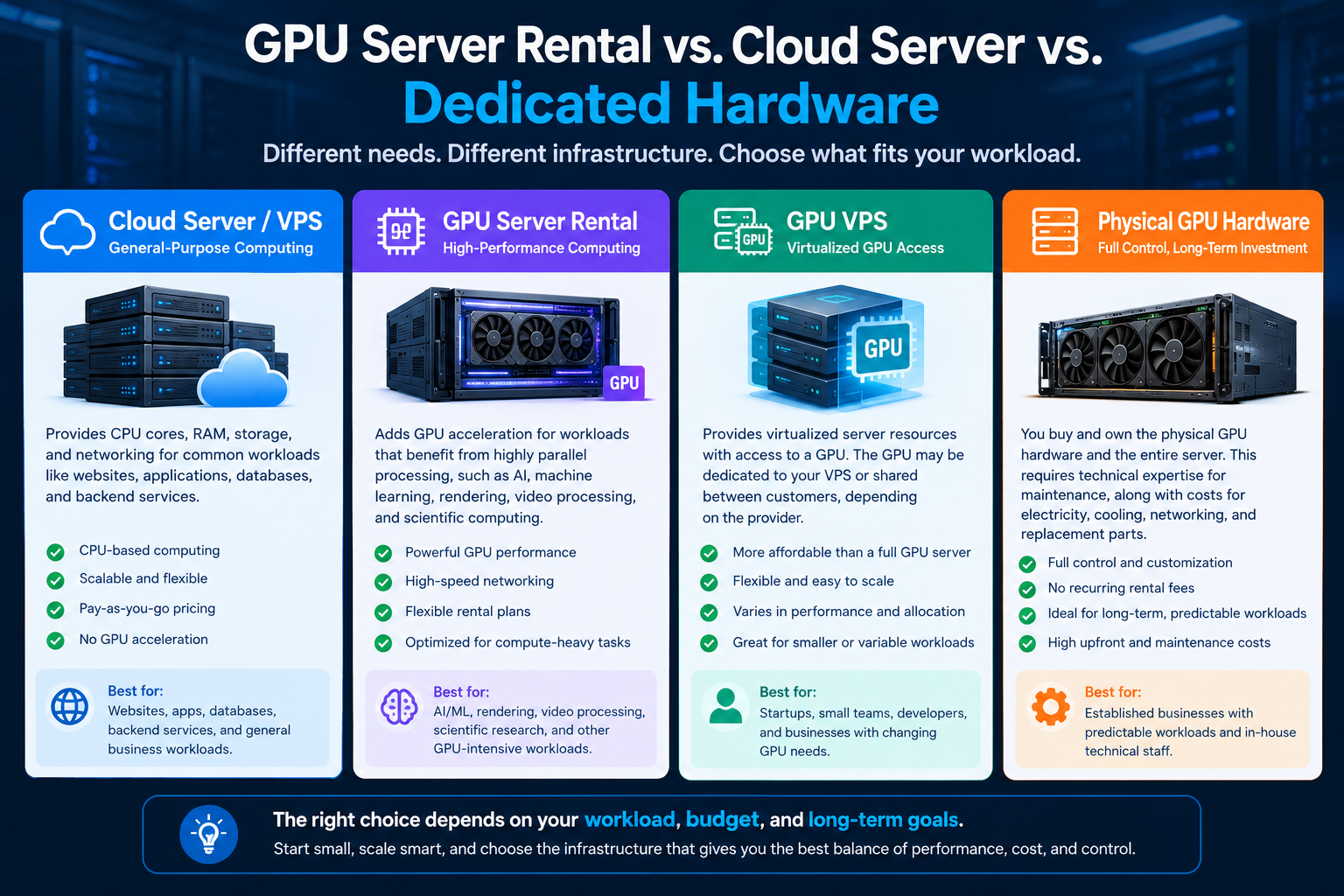
These terms are often used interchangeably, but they describe fairly different infrastructure options.
Cloud Server or VPS
A cloud server or VPS is general-purpose computing. You get CPU cores, RAM, storage, and networking for workloads such as websites, applications, databases, and backend services.
Think of the server running a WordPress website or Node.js application. For many businesses, this is all the computing infrastructure they need.
GPU Server Rental
A GPU server rental adds GPU acceleration for workloads that benefit from highly parallel processing.
AI and machine learning, rendering, video processing, and certain scientific or engineering workloads are common examples.
GPU VPS
A GPU VPS is another option worth considering. It generally provides virtualized server resources with access to a GPU, rather than giving you an entire physical GPU server.
Depending on the provider, the GPU may be dedicated to your VPS or partitioned between customers.
This can make a GPU VPS more affordable and flexible, although performance and resource allocation vary between providers.
Buying Physical GPU Hardware
Then there’s buying physical GPU hardware. This can make sense if you have a predictable workload that will run for years, have the technical staff to maintain the infrastructure, and can justify the upfront investment.
Cost of Physical GPU Hardware
A high-end consumer GPU can cost thousands of dollars by itself, while data-center GPUs can be considerably more expensive.
You also have to account for the rest of the server, electricity, cooling, networking, replacement parts, and maintenance.
When Buying Hardware Makes Sense
For a startup that is still testing whether an AI feature will work, buying all that hardware upfront can be a difficult investment to justify.
Choosing the Right GPU Infrastructure
Here’s a simple way to think about the options:
| Situation | Best Fit |
|---|---|
| Running a website, blog, or eCommerce store | Standard cloud server |
| Testing an AI model before committing | GPU rental (hourly) |
| Running production AI inference 24/7 | GPU rental (monthly/dedicated) |
| Multi-year, high-volume, predictable GPU workload | Buying hardware |
How to Choose a GPU Billing Model
Hourly Billing
Hourly billing works well when you need GPU power for short or unpredictable periods.
You might use it for testing a model, running a one-time rendering job, or experimenting with a new AI framework.
Monthly Billing
Monthly billing makes more sense for workloads that run regularly.
If a server is active for most of the month, a monthly plan can be considerably more economical than paying the hourly rate continuously.
Dedicated vs. Shared GPU
This is another detail that’s easy to overlook.
Dedicated GPU
A dedicated GPU is reserved for your workload.
If predictable performance is important, dedicated GPU resources can be a better fit for workloads that need consistent performance.
Shared or Virtualized GPU
A shared or virtualized GPU may be partitioned between multiple users.
Shared resources aren’t necessarily bad, but performance can differ depending on how the provider allocates resources.
Check GPU Allocation Before Ordering
If predictable performance is important, confirm exactly what GPU access your plan includes before ordering.
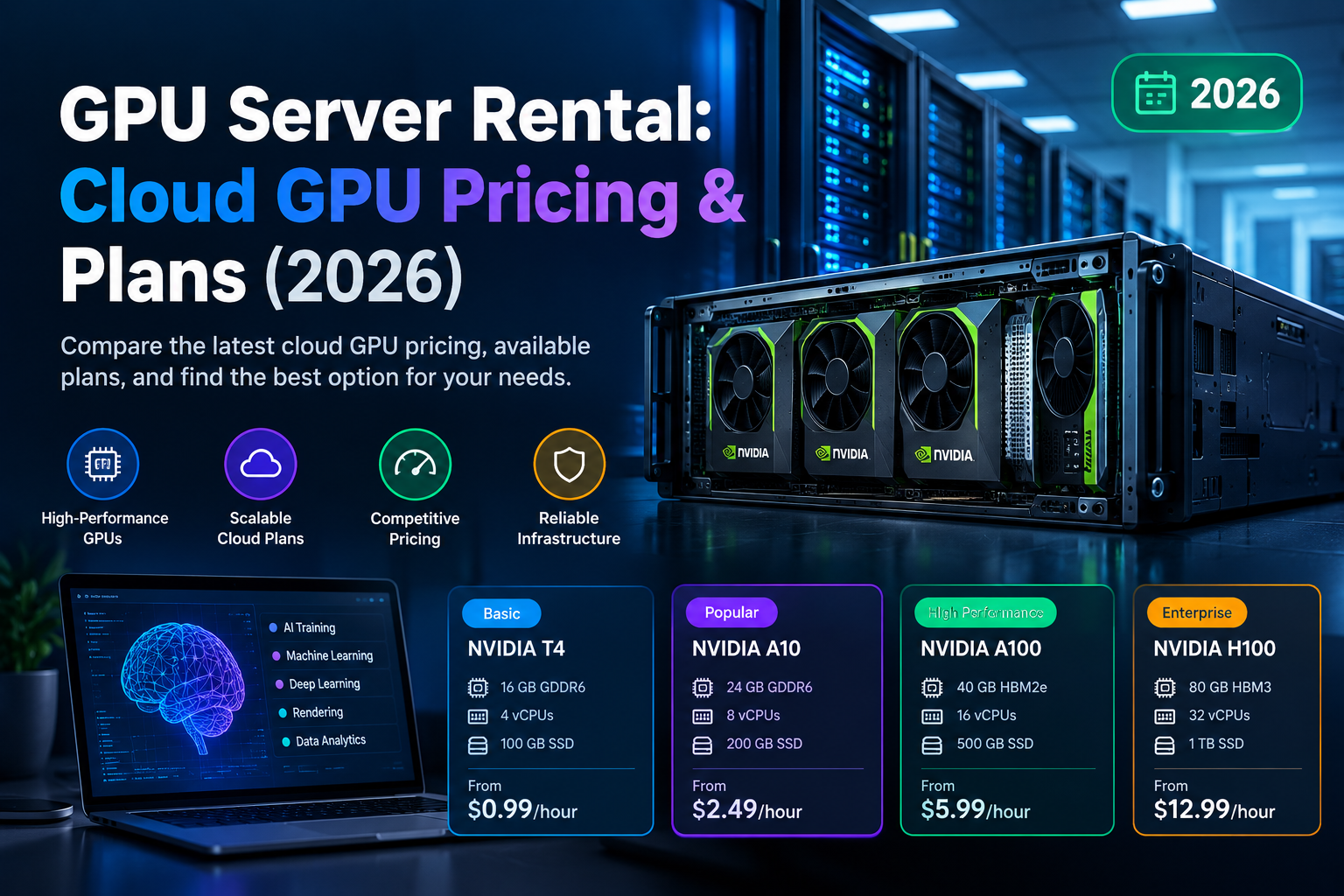
Typical GPU Price Ranges
The following ranges are broad market examples rather than fixed prices.
Entry-Level GPUs
Entry-level GPUs typically cost roughly $20–80/month.
They can be suitable for testing, light rendering, and some emulator workloads.
Mid-Tier GPUs
Mid-tier GPUs typically cost roughly $150–450/month.
They can be suitable for Stable Diffusion, LoRA fine-tuning, and demanding rendering.
Data-Center GPUs
Data-center GPUs can cost roughly $1–3+ per hour or $1,500–3,000+/month.
These GPUs are designed for serious AI training, fine-tuning, and production inference.
What Affects GPU Pricing?
Prices can vary substantially based on the GPU model, region, storage, bandwidth, contract length, and whether the hardware is dedicated.
Example: Calculating GPU Rental Cost
For example, suppose a small fine-tuning job requires approximately 20 hours of GPU time.
If an A100 instance costs around $1.50 per hour, the compute portion would be about $30.
Renting a monthly server at $2,000 for the same 20-hour job wouldn’t make much sense.
On the other hand, if that GPU is running continuously for production inference, monthly pricing can become much more attractive.
Check Bandwidth and Egress Costs
You should also check bandwidth and egress charges.
Moving large datasets into and out of a GPU server can add unexpected costs, particularly when processing or serving media at scale.
View Current GPU Pricing Plans
For a current view of available options, view current GPU pricing plans →.
How Much GPU Power Do You Actually Need? (By Use Case)
The right GPU depends much more on the workload than on the GPU’s headline specifications.
If you’re trying to rent GPU for AI workloads specifically, the first question to answer is whether you’re training, fine-tuning, or running inference.
AI Developers and Startups
If you’re building a chatbot, summarizer, recommendation system, or another AI feature, you don’t necessarily need the most powerful GPU available.
with [standard cloud server plans] before committing to a more expensive GPU setup.
For most users, starting with the smallest infrastructure that can handle the workload is the safer approach. You can always scale up once you have real performance data.
GPU Pricing Explained: What Actually Drives GPU Hosting Cost
GPU pricing can look confusing because two servers with similar CPU and RAM specifications can have dramatically different prices once you add a GPU.
Once you understand what drives GPU hosting cost, the pricing starts to make more sense.
GPU Model and Generation
The GPU itself is usually the biggest factor.
An entry-level consumer GPU can be suitable for basic rendering, experimentation, and development. A higher-end card such as an RTX 4090 provides considerably more processing power and VRAM for demanding workloads.
Data-center GPUs such as the NVIDIA A100 and H100 are designed for large-scale AI and compute workloads. They also cost considerably more because they are built for demanding enterprise and data-center environments.
VRAM
For AI workloads, VRAM can be just as important as raw GPU performance.
A model may technically be compatible with a particular GPU but still fail to run if there isn’t enough available VRAM. For example, a 7-billion-parameter model can require roughly 14GB simply to hold the weights in FP16, before accounting for additional memory needed during inference or fine-tuning.
That’s why choosing a GPU based only on its model name can be misleading. Always check the actual VRAM requirement of your workload.Training a model from scratch can require substantial compute resources, but many startups work with existing open-source models instead. Fine-tuning a 7B model with LoRA, for example, can often be done on a GPU with 24GB of VRAM, depending on the model, configuration, batch size, and training method.
Inference can require considerably less hardware, particularly when using smaller models or optimized inference techniques.
Rendering and Video Agencies
For agencies working with Blender, Cinema 4D, Unreal Engine, Redshift, Octane, or similar tools, both GPU performance and VRAM matter.
Some rendering workloads can benefit significantly from multiple GPUs. A dual-GPU server may reduce render times and help teams get through client projects faster.
A high-end consumer GPU such as an RTX 4090 can handle many professional rendering workloads without requiring data-center-level hardware.
If rendering is your primary workload, compare [GPU rendering server options] based on the applications and render engines you actually use.
eCommerce and AI Image Processing
An eCommerce business experimenting with AI might use GPU resources for product image generation, background removal, image classification, recommendation systems, or visual search.
These workloads are often inference-heavy rather than training-heavy. In many cases, a mid-range GPU running batch jobs is enough.
You don’t need an H100 simply because the workload involves AI.
Websites and Small Businesses
probably don’t need a GPU server at all.
A standard cloud server will generally be more economical and easier to manage.
Hourly vs Monthly vs Long-Term Billing — Which Should You Choose?
The billing model can have almost as much impact on your total cost as the GPU itself.
Hourly or on-demand billing is useful for short, experimental, or unpredictable workloads. You can start an instance when you need it and stop paying when you’re finished.
The downside is easy to understand: if you forget to shut down an instance, the meter keeps running.
Monthly billing works better for workloads that operate continuously. Production inference endpoints, development environments, and ongoing rendering workloads are common examples.
Once you’re using a GPU for a substantial portion of the month, monthly pricing can become more economical than paying the on-demand rate.
Annual or reserved billing can offer the lowest effective hourly cost, but it comes with less flexibility. It makes sense when you’ve already confirmed that the workload is stable.
A practical approach is to start hourly while you’re testing. Once you know exactly what GPU you need and how frequently you’ll use it, move to a monthly plan. Consider an annual commitment only after your usage pattern has remained consistent for several months.
You can [compare billing plans] before deciding which model fits your expected usage.
What to Check Before You Rent a GPU Server (Buyer’s Checklist)
Before choosing a provider, look beyond the GPU model and advertised monthly price.
Is the GPU Actually Dedicated?
This matters most if you’re comparing a GPU VPS against a fully dedicated server.
Some providers use virtualization or GPU partitioning to share hardware between customers. That’s not automatically a problem, but you should understand exactly what you’re paying for.
If consistent performance is important, ask whether the GPU is dedicated and whether the specifications are guaranteed.
Where Is the Data Center?
Location matters when latency is important.
For real-time inference applications, placing the server closer to your users can improve responsiveness. For overnight training or batch processing, latency may be much less important.
What Is the Support Actually Like?
A provider advertising “24/7 support” doesn’t necessarily tell you how quickly a technical problem will be resolved.
GPU workloads can involve drivers, CUDA versions, operating-system issues, networking, and hardware availability. Look for clear support policies and independent customer feedback.
You can also review [our support commitment] before making a decision.
Does the Server Support Your Software Stack?
Check compatibility before ordering.
Depending on your workload, you may need specific versions of:
- CUDA
- NVIDIA drivers
- PyTorch
- TensorFlow
- Docker
- Linux distributions
- Windows Server
A server that looks perfect on paper isn’t very useful if your software stack won’t run correctly on it.
What Is the Exit Path?
Check cancellation terms before signing a long-term contract.
Can you cancel easily? Can you take snapshots or export your environment? What happens to your data after cancellation?
Be cautious when specifications are vague, GPU availability isn’t clearly stated, basic pricing is hidden behind “contact sales,” or there is no practical way to test the service.
Transparent providers should make the core specifications and pricing easy to understand.
Cloud GPU Rental Providers Compared (At a Glance)
Choosing the right GPU server rental provider depends entirely on your workload and budget. There isn’t one provider that is best for every user.
The market broadly falls into several categories:
| Type | Starting Price | Best For | Trade-off |
| Budget GPU VPS hosts | ~$20–80/month | Testing, light rendering, emulators | Smaller GPU selection |
| Mid-market GPU rental | ~$150–450/month | Fine-tuning, rendering, small AI products | Less elastic than hyperscalers |
| Hyperscalers | Pay-as-you-go, often $1–4+/hour | Enterprise workloads and cloud integration | Complex pricing and possible egress fees |
| Specialized AI cloud platforms | Competitive pay-as-you-go rates | AI training and fine-tuning | Less suited to general hosting |
For startups and independent developers, mid-market and specialized GPU providers can offer a useful balance between performance, cost, and simplicity.
If your infrastructure already runs heavily on AWS, Google Cloud, or Azure, keeping GPU workloads within the same ecosystem may simplify networking and account management.
You can [view current plans and pricing] if you want to compare available GPU configurations before choosing a server.
Step-by-Step: How to Rent Your First GPU Server
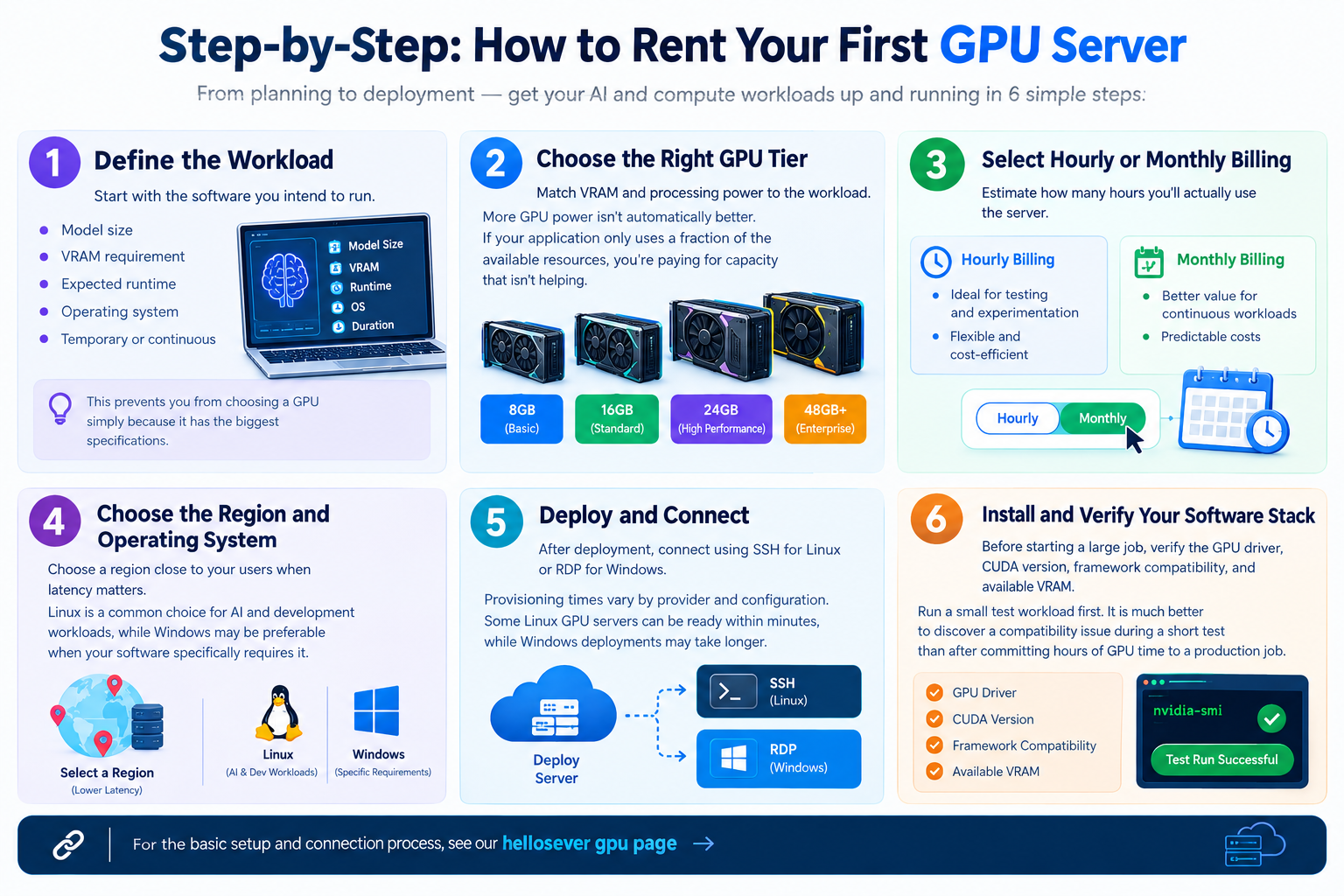
1. Define the Workload
Start with the software you intend to run.
Write down the model size, VRAM requirement, expected runtime, operating system, and whether the workload is temporary or continuous.
This prevents you from choosing a GPU simply because it has the biggest specifications.
2. Choose the Right GPU Tier
Match VRAM and processing power to the workload.
More GPU power isn’t automatically better. If your application only uses a fraction of the available resources, you’re paying for capacity that isn’t helping you.
3. Select Hourly or Monthly Billing
Estimate how many hours you’ll actually use the server.
If you’re experimenting, hourly billing provides flexibility. If you’re running a production workload continuously, monthly billing may provide better value.
4. Choose the Region and Operating System
Choose a region close to your users when latency matters.
Linux is a common choice for AI and development workloads, while Windows may be preferable when your software specifically requires it.
5. Deploy and Connect
After deployment, connect using SSH for Linux or RDP for Windows.
Provisioning times vary by provider and configuration. Some Linux GPU servers can be ready within minutes, while Windows deployments may take longer.
6. Install and Verify Your Software Stack
Before starting a large job, verify the GPU driver, CUDA version, framework compatibility, and available VRAM.
Run a small test workload first. It is much better to discover a compatibility issue during a short test than after committing hours of GPU time to a production job.
Frequently Asked Questions
Is GPU server rental cheaper than buying a GPU?
For many individuals, startups, and small teams, renting can be more economical in the short to medium term. Buying hardware requires a significant upfront investment as well as electricity, cooling, maintenance, and replacement costs.
However, purchasing can become more attractive when a GPU is used heavily and consistently over several years. The right choice depends on utilization and total cost of ownership.
Can I rent a GPU server for gaming or emulators, not just AI?
Yes. GPU servers can also be used for Android emulators, application testing, automation, cloud gaming environments, rendering, and other GPU-intensive workloads.
What’s the difference between a GPU VPS and a dedicated GPU server?
A GPU VPS generally provides virtualized server resources with access to a GPU. Depending on the provider, GPU resources may be dedicated or partitioned.
A dedicated GPU server gives you exclusive access to the physical server and its GPU. Dedicated infrastructure generally provides more predictable performance but usually costs more.
Do I need a GPU server for a normal eCommerce website?
Usually, no.