
If you’ve been searching for a dedicated server, you’ve probably read the same basic explanation several times: it’s a physical machine, you get full control, and performance is generally more consistent than shared hosting. All of that is true. However, it doesn’t answer the questions that actually matter. How much does a dedicated server really cost? When does it make sense to move from VPS or cloud hosting? And what happens when the hardware needs maintenance?
A dedicated server gives one customer exclusive access to an entire physical machine. That means the CPU, RAM, storage, and other hardware resources aren’t shared with other customers. In this guide, you’ll learn how a dedicated server works, what it really costs, who needs one, and when VPS or cloud hosting may be a better option.
More importantly, this guide focuses on practical hosting considerations such as workload requirements, resource usage, scalability, server management, security, migration planning, and total infrastructure cost. Therefore, instead of simply choosing the most powerful server available, you can choose infrastructure based on your actual requirements.
What Is a Dedicated Server?
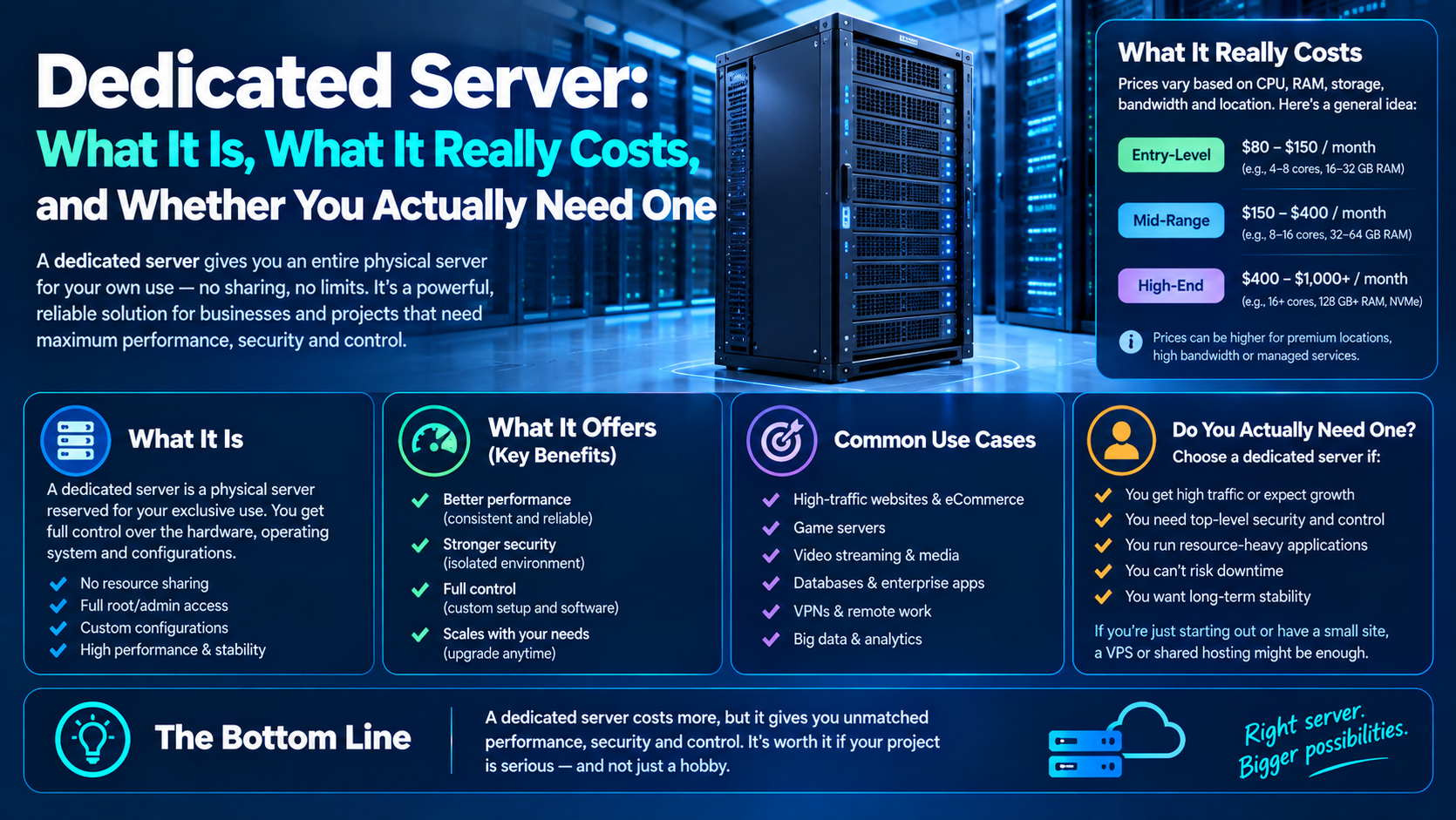
A dedicated server is one physical machine located in a data center and reserved for a single customer. Its CPU, RAM, storage, and network resources are dedicated to that customer rather than being divided among multiple hosting accounts.
Unlike shared hosting, where many websites use the same server resources, a dedicated server gives you the entire physical machine. As a result, other customers’ workloads don’t directly compete with yours for the same physical CPU, RAM, or storage resources.
A dedicated server is also different from a VPS. A VPS uses virtualization to divide a physical machine into separate virtual environments. Meanwhile, cloud hosting typically uses a pool of virtualized infrastructure that can provide greater flexibility when demand changes.
A dedicated server is often described as a bare metal server because your workload runs directly on physical hardware rather than inside a traditional virtual machine.
How a Dedicated Server Differs From Shared Hosting
Shared hosting places multiple websites on one physical server. Therefore, it is generally less expensive and easier to manage, making it suitable for smaller websites and basic projects.
However, shared hosting provides less control and fewer guaranteed resources. If your website grows or your application requires more CPU, RAM, or storage performance, you may eventually need a more powerful hosting environment.
How a Dedicated Server Differs From a VPS
A VPS gives you a virtual environment with allocated resources while the underlying physical machine remains shared with other VPS customers.
By contrast, a dedicated server gives you the complete physical machine. Consequently, you have greater control over the hardware and don’t have other VPS customers using the same physical server.
How a Dedicated Server Differs From Cloud Hosting
Cloud hosting generally focuses on flexibility and scalability. Resources can often be increased or reduced through the provider’s platform.
A dedicated server, on the other hand, provides fixed physical resources. Therefore, it can be useful for workloads that are consistently high and predictable.
Dedicated Server Hosting: What Does It Include?
When you purchase dedicated server hosting, you’re typically renting an entire physical server from a hosting provider. The exact configuration depends on the provider and plan.
CPU and RAM
The CPU determines how much processing capacity the server has, while RAM affects how much data and how many applications can remain readily available in memory.
For example, a simple website may require relatively little RAM, whereas a database-heavy eCommerce application may require substantially more.
Therefore, CPU and RAM should be selected according to your application’s actual workload rather than simply choosing the highest available specifications.
Storage and RAID
Dedicated servers can use SSD or NVMe storage, depending on the provider and configuration.
NVMe storage can provide high storage performance and low latency, which can be useful for databases, large applications, and workloads with frequent disk operations.
In addition, some dedicated servers support RAID configurations. RAID can improve redundancy or performance depending on the configuration, although RAID should not be considered a replacement for backups.
Network and IP Addresses
A dedicated server typically includes network connectivity and one or more IP addresses.
However, bandwidth policies differ between providers. Some offer high or unmetered bandwidth, while others have specific limits or charge for additional usage.
Consequently, businesses with large amounts of video, file downloads, or application traffic should review the provider’s bandwidth policy carefully.
Remote Server Management
Many dedicated servers provide IPMI or another out-of-band management system.
This can be particularly useful when the operating system becomes unavailable. For example, administrators may still be able to access the machine remotely, inspect hardware status, or troubleshoot boot problems.
As a result, remote management can be an important feature for businesses operating production infrastructure.
Dedicated Server vs VPS vs Cloud vs Shared Hosting
Choosing between hosting types depends on traffic, workload, budget, scalability, and technical expertise. Therefore, there is no universal hosting solution that is best for every website or application.
Shared Hosting
Shared hosting is usually the simplest and least expensive option.
It can work well for:
- Personal blogs
- Small business websites
- Portfolio websites
- Low-traffic websites
- Basic informational websites
However, resource limitations can become more noticeable as traffic and application requirements increase.
VPS Hosting
VPS hosting provides a middle ground between shared hosting and dedicated infrastructure.
You receive a virtual environment with allocated resources and greater administrative control. At the same time, the underlying physical hardware is still shared.
For this reason, VPS hosting is often suitable for growing websites, APIs, development environments, and smaller applications.
Cloud Hosting
Cloud hosting focuses on flexibility and scalability.
For example, if traffic increases significantly during a product launch, cloud infrastructure can often be scaled more easily than a fixed physical server.
However, cloud pricing can become more complex when workloads grow significantly or remain active around the clock.
Dedicated Server Hosting
A dedicated server provides an entire physical machine for one customer.
As a result, it can provide predictable access to CPU, RAM, storage, and network resources.
Nevertheless, dedicated infrastructure has less flexibility than cloud infrastructure when capacity needs to change suddenly. Therefore, it is particularly worth considering when your workload is substantial and relatively predictable.
How Much Does a Dedicated Server Cost?
The advertised monthly price is only one part of the total dedicated server cost.
Your actual expense can depend on:
- CPU
- RAM
- Storage
- RAID configuration
- Bandwidth
- IP addresses
- Server management
- Backup services
- Monitoring
- Setup fees
- Contract length
Therefore, comparing only the headline monthly price can give you an incomplete picture.
Entry-Level Dedicated Server Cost
Entry-level dedicated servers generally provide a basic CPU, moderate RAM, and standard storage.
A typical range may be around $80–$150 per month, although pricing varies between providers and configurations.
These servers can be suitable for smaller applications that have outgrown VPS or shared hosting but don’t require high-end hardware.
Mid-Range Dedicated Server Cost
Mid-range servers generally provide more powerful processors, additional RAM, and faster storage such as NVMe SSDs.
These configurations may cost approximately $150–$300 per month.
For example, a growing eCommerce application or database-heavy website may require this level of hardware.
High-Performance Dedicated Server Cost
High-performance configurations can include high-core-count CPUs, large memory capacities, multiple NVMe drives, and advanced RAID configurations.
These servers can cost $300–$600+ per month, depending on the hardware and services included.
Specialized servers can cost considerably more. Therefore, businesses should compare performance requirements against total infrastructure costs before choosing high-end hardware.
Additional Dedicated Server Costs
The monthly server rental is not necessarily your complete hosting bill.
Setup Fees
Some providers charge a one-time setup or provisioning fee, especially for customized configurations.
Management Fees
An unmanaged server usually requires you to handle updates, security, monitoring, and troubleshooting yourself.
In contrast, a managed dedicated server includes additional administrative support and may cost significantly more.
Backup Costs
Backup storage and automated backup services may be charged separately.
Furthermore, businesses should calculate how much backup storage they need and how frequently backups must run.
Bandwidth Costs
Some plans include large or unmetered bandwidth allowances. Others charge for usage above a specific limit.
Therefore, websites with large files, video, downloads, or high traffic should check bandwidth terms before purchasing.
Additional IP Addresses
Some applications require additional IP addresses. These may create additional monthly costs depending on the provider.
Real Dedicated Server Cost Example
Suppose you’re running an eCommerce website with approximately 200,000 monthly visits and a database-heavy application such as Magento or WooCommerce.
A VPS environment capable of supporting the workload might require multiple instances, potentially costing $150–$250 per month depending on configuration.
Meanwhile, a dedicated server with sufficient CPU, RAM, and NVMe storage might cost approximately $200–$300 per month.
However, these figures are examples rather than universal pricing. Actual requirements depend on database queries, application architecture, caching, traffic patterns, CPU utilization, memory usage, and storage I/O.
Consequently, the best way to estimate your infrastructure cost is to analyze your current resource usage rather than relying only on visitor numbers.
Who Needs a Dedicated Server?
Not every business needs a dedicated server. Instead, the decision should be based on workload, performance requirements, scalability, budget, and technical expertise.
Dedicated Server for Startups
Most early-stage startups don’t need dedicated infrastructure immediately.
If traffic is unpredictable and the product is still being validated, VPS or cloud hosting can provide greater flexibility.
However, once resource requirements become more predictable, a dedicated server may become a practical option.
Before upgrading, startups should monitor:
- CPU utilization
- RAM usage
- Database performance
- Disk I/O
- Network traffic
- Application response times
As a result, the infrastructure decision can be based on actual data rather than assumptions.
Dedicated Server for eCommerce
Large eCommerce websites may benefit from dedicated infrastructure when they consistently require substantial CPU, RAM, storage, or database performance.
However, a dedicated server isn’t automatically necessary for every online store.
A properly configured VPS or cloud environment may be sufficient for many businesses. Therefore, store owners should evaluate caching, database optimization, CDN usage, application performance, and code efficiency before upgrading hardware.
For stores with consistently high traffic and predictable workloads, dedicated infrastructure can provide greater control over the hosting environment.
Dedicated Server for Developers and Agencies
Developers and agencies may use dedicated servers when they need greater control over the software environment.
For example, agencies may host multiple client websites or applications on infrastructure they manage directly.
Furthermore, dedicated hardware can be useful when a specific software stack requires configurations that are difficult to achieve on shared hosting.
However, agencies should also consider the operational workload involved in patching, monitoring, backups, security, and incident response.
Dedicated Server for SaaS Platforms
SaaS applications with consistently high resource consumption may benefit from dedicated hardware.
A dedicated server can provide predictable CPU, RAM, storage, and network resources for applications that perform continuous database operations.
Nevertheless, a SaaS company should evaluate whether a dedicated server, cloud architecture, database cluster, or distributed infrastructure best fits its workload.
Dedicated Server for High-Traffic Websites
High-traffic publishers and content platforms may consider dedicated servers when their workloads remain consistently high.
For example, a media website with millions of pageviews may require substantial server resources.
However, traffic alone doesn’t automatically mean that dedicated hardware is required. Caching, CDNs, database optimization, and application architecture can also have a major impact on performance.
Other Dedicated Server Use Cases
Dedicated servers can also support:
- Game servers
- High-performance databases
- Media and file storage
- Specialized enterprise applications
- Machine-learning workloads
- GPU workloads
- Development environments
- High-volume applications
Because each workload is different, the hardware should be selected according to actual CPU, RAM, storage, and network requirements.
When Should You Not Use a Dedicated Server?
Although dedicated infrastructure provides substantial resources, it isn’t always the right solution.
When Traffic Is Spiky and Unpredictable
Dedicated hardware provides fixed capacity.
If your traffic doubles for a few days and then returns to normal, you may end up paying for unused capacity for most of the month.
In contrast, cloud hosting can provide greater flexibility when demand changes frequently.
When You Don’t Have Server Management Expertise
An unmanaged dedicated server requires technical knowledge.
Your team may need to manage:
- Operating-system updates
- Security configuration
- Firewalls
- Monitoring
- Backups
- Troubleshooting
- Incident response
Therefore, if you don’t have someone comfortable with server administration, a managed service may be more suitable.
When You’re Still Validating Your Product
Early-stage businesses often benefit from flexibility.
If you don’t yet know how much CPU, RAM, storage, or bandwidth your application will require, VPS or cloud hosting may reduce the risk of paying for unnecessary capacity.
Later, once your requirements become clearer, you can migrate to a dedicated server.
When Cloud Hosting Already Meets Your Needs
If a managed cloud service or PaaS already provides the performance, scalability, and features your application requires, moving to dedicated hardware may add operational work without providing a meaningful advantage.
Therefore, the goal should be to choose infrastructure that solves your actual requirements rather than simply choosing the most powerful server.
Managed vs Unmanaged Dedicated Server
One of the most important decisions is whether you want to manage the server yourself or pay the provider for management.
What Is an Unmanaged Dedicated Server?
An unmanaged dedicated server provides the physical machine and basic connectivity while leaving most server administration to you.
Depending on the provider, you may need to:
- Install and update software
- Configure the firewall
- Secure SSH
- Monitor server health
- Manage backups
- Troubleshoot software problems
- Respond to security incidents
As a result, unmanaged hosting is generally more suitable for technically experienced teams.
What Is a Managed Dedicated Server?
A managed dedicated server provides additional administrative support from the hosting provider.
Services may include:
- Operating-system updates
- Server monitoring
- Security assistance
- Backup management
- Technical support
- Basic troubleshooting
Managed hosting costs more. However, it can reduce the operational burden on your internal team.
Which Dedicated Server Management Option Should You Choose?
If your team has strong system-administration expertise, an unmanaged server may be appropriate.
On the other hand, if server management would take developers away from product development, managed hosting can turn that operational responsibility into a predictable service cost.
Ultimately, the right option depends on your team’s skills, workload, budget, and support requirements.
Dedicated Server Security Responsibilities
A dedicated server does not automatically make your application secure.
Instead, security depends heavily on how the server, operating system, network, and applications are configured.
Operating System Hardening
Disable unnecessary services and keep the operating system and installed packages updated.
Regular patching reduces exposure to known vulnerabilities.
Secure SSH Access
Use key-based authentication where possible and restrict unnecessary remote access.
Additionally, avoid leaving unnecessary administrative services publicly accessible.
Firewall and Intrusion Protection
Configure a firewall to allow only the ports and services that your applications actually require.
Furthermore, appropriate intrusion-prevention tools can help reduce repeated unauthorized login attempts.
Web Application Protection
For public-facing applications, consider using a web application firewall where appropriate.
This can add another security layer between incoming web requests and your application.
RAID and Hardware Monitoring
If your dedicated server uses RAID, monitor the array and replace failed drives promptly.
However, RAID is not a backup. It can help maintain availability after certain disk failures, but it does not protect against accidental deletion, malware, or other forms of data loss.
Backup and Disaster Recovery
Maintain regular backups and test restoration procedures periodically.
Importantly, a backup that has never been restored is not a fully tested backup strategy.
Therefore, businesses should regularly verify that critical files and databases can actually be recovered.
How to Choose a Dedicated Server Provider
Once you’ve decided that dedicated server hosting fits your requirements, provider selection becomes important.
Don’t compare providers based only on CPU and RAM. Instead, evaluate the complete service.
Check Dedicated Server Hardware
Check the processor generation, RAM capacity, storage technology, RAID options, and upgrade possibilities.
Older hardware may have a lower monthly price. However, newer processors and storage technologies can provide better performance and efficiency depending on the workload.
Compare Data Center Locations
Choose a data center that provides reasonable network latency to your primary users.
For example, if most of your customers are located in one region, a nearby data center can improve network responsiveness.
Review Network Redundancy
For business-critical applications, investigate network architecture, upstream connectivity, bandwidth policies, and redundancy.
As a result, you can better understand how the provider handles network failures.
Check SLA Terms
Read the actual Service Level Agreement.
Look for:
- Uptime commitments
- Maintenance policies
- Support response targets
- Hardware replacement terms
- Compensation policies
However, an SLA should not replace your own backup and disaster-recovery strategy. It defines the provider’s commitments, but it doesn’t guarantee that your application will never experience downtime.
Compare Contract Flexibility
Review setup fees, minimum contract periods, renewal pricing, cancellation policies, and hardware upgrade options.
In addition, check whether changing hardware requires a complete migration.
Evaluate Technical Support
Technical support becomes particularly important when physical hardware fails.
Therefore, look for information about response times, hardware replacement procedures, escalation processes, and support availability.
How to Migrate to a Dedicated Server
Moving to a dedicated server requires more planning than simply changing a hosting package.
First, configure and test the new environment before changing DNS.
Prepare the New Dedicated Server
Install the operating system and required applications.
Then configure:
- Firewall rules
- SSH access
- SSL certificates
- Databases
- Web servers
- Monitoring
- Backups
Transfer Website and Database Data
Transfer your website files, databases, configuration files, and other required data.
For large databases or file collections, estimate transfer time before scheduling the migration.
Otherwise, the migration window may become longer than expected.
Test Before DNS Changes
Don’t change DNS immediately.
Instead, test the new server thoroughly.
Check:
- Website pages
- Login functionality
- Databases
- APIs
- Payment processing
- Background jobs
- Email delivery
- File uploads
- SSL certificates
- Monitoring
As a result, you can identify problems before users are directed to the new environment.
Complete the DNS Cutover
Reduce DNS TTL before the final migration when appropriate.
Then perform the final data synchronization and update the DNS records.
Meanwhile, keep the previous server available until the new environment has been verified.
Keep a Rollback Plan
A rollback plan is essential.
If a problem appears after the DNS change, you should already know how to restore service using the previous environment.
Therefore, don’t treat rollback as something you’ll figure out after a failure occurs.
Frequently Asked Questions About Dedicated Servers
What Is the Difference Between a Dedicated Server and a VPS?
A VPS is a virtual environment created on physical hardware that may host multiple VPS instances.
In comparison, a dedicated server provides an entire physical machine to one customer.
How Much Does a Dedicated Server Cost Per Month?
A dedicated server can cost roughly $80–$600+ per month, depending on hardware, storage, bandwidth, management, and provider.
However, high-performance or specialized configurations can cost considerably more.
Is a Dedicated Server Better for SEO?
A dedicated server does not automatically improve SEO rankings.
However, reliable infrastructure can support faster response times, stable uptime, and consistent website performance.
SEO also depends on content quality, technical SEO, Core Web Vitals, mobile usability, backlinks, and other ranking factors.
Therefore, a well-optimized VPS can outperform a poorly configured dedicated server.
Can I Upgrade From VPS to a Dedicated Server Later?
Yes.
Moving from VPS hosting to a dedicated server is a common infrastructure transition.
However, the migration may require application testing, data transfer, DNS changes, and downtime planning.
Do I Need a Dedicated Server for eCommerce?
Not necessarily.
Small and medium-sized stores can often operate successfully on VPS or cloud hosting.
However, a dedicated server becomes more relevant when an eCommerce application has consistently high resource requirements or needs greater control over its physical infrastructure.
What Happens If Dedicated Server Hardware Fails?
Because a dedicated server uses physical hardware, a hardware failure can require the provider to repair or replace the affected component.
As a result, downtime may occur depending on the provider’s redundancy, spare-parts availability, and recovery procedures.
Regular backups and a clear disaster-recovery plan can reduce the impact of hardware failures.
A Simple Dedicated Server Decision Framework
Before choosing a dedicated server, ask yourself four questions.
Is Your Workload Heavy and Predictable?
Predictable, consistently high workloads can fit dedicated infrastructure well.
On the other hand, highly variable workloads may benefit more from cloud scalability.
Do You Have Server Management Capacity?
If your team cannot manage an unmanaged server, consider a managed dedicated server or another hosting model.
Therefore, technical expertise should be part of your infrastructure budget.
Does the Total Dedicated Server Cost Make Sense?
Compare the complete cost of dedicated, VPS, and cloud infrastructure.
Don’t compare only the monthly base price.
Instead, include management, backups, bandwidth, monitoring, setup, and migration costs.
Have You Validated Your Infrastructure Requirements?
If your application is still growing and resource requirements are uncertain, flexible infrastructure may be more appropriate.
Once you have reliable usage data, you can make a more informed decision about dedicated hardware.
Final Thoughts on Choosing a Dedicated Server
A dedicated server can be a useful infrastructure option when you need predictable physical resources, substantial performance, and greater control.
However, dedicated hosting isn’t automatically the right choice for every website or application.
If your workload is predictable, your resource requirements are consistently high, and your team can manage the infrastructure, a dedicated server may fit your needs well.
On the other hand, if your traffic is unpredictable, your product is still being validated, or your team lacks server-management expertise, VPS or cloud hosting may provide greater flexibility.
Ultimately, the best approach is to match your hosting environment to your actual workload, budget, technical expertise, scalability requirements, and growth expectations.
Before committing to a long-term plan, compare your current CPU, RAM, storage, database, bandwidth, and traffic requirements. Then choose the dedicated server configuration—or alternative hosting model—that meets those requirements without paying for capacity you don’t actually need.