If your website crashes during a sale, your application slows down whenever traffic increases, or your hosting provider keeps blaming shared resources, you may be ready to consider a dedicated server. For businesses that have outgrown shared hosting or a VPS, dedicated infrastructure can provide greater consistency, control, and predictable performance.
A dedicated server is a physical machine leased exclusively to one customer. As a result, you get the full CPU, RAM, storage, and network resources instead of sharing the physical hardware with other customers. Therefore, dedicated infrastructure can be particularly useful for high-traffic websites, resource-intensive applications, eCommerce platforms, gaming workloads, databases, and AI/ML projects.
Unlike shared hosting, where multiple websites use the same server resources, a dedicated server gives you the entire physical machine. Meanwhile, a VPS provides an isolated virtual environment while the underlying physical hardware remains shared.
This guide takes a practical, buyer-focused approach to server infrastructure. Rather than recommending one configuration for everyone, we’ll examine workload requirements, hardware specifications, pricing, security, management options, migration, and the factors that actually matter when choosing a provider.
What Is a Dedicated Server?
A dedicated server is a physical server located in a data center and allocated exclusively to one customer. Unlike shared hosting or a VPS, the physical CPU, memory, storage, and network resources aren’t being used by unrelated customers on the same machine.
You can rent a dedicated server from a hosting provider, purchase your own hardware and colocate it in a data center, or use dedicated bare-metal infrastructure for specialized workloads.
The term bare metal server is often used interchangeably with dedicated server. Technically, however, bare metal emphasizes that your operating system runs directly on physical hardware rather than inside a virtual machine managed by a hypervisor.
With a dedicated server, you typically get:
- Full access to the server’s CPU and RAM
- Dedicated physical storage
- Root or administrator access
- A dedicated IP address
- Freedom to install your preferred operating system and software
- Greater control over security and firewall configuration
- The ability to run custom applications and software stacks
- More predictable performance for sustained workloads
However, greater control also means greater responsibility. With unmanaged infrastructure, you’re responsible for operating-system updates, security configuration, monitoring, backups, and troubleshooting. Alternatively, managed services can shift much of that responsibility to the provider.
Dedicated Server vs VPS vs Cloud vs Shared Hosting
Choosing between infrastructure types starts with understanding how resources are allocated.
|
Feature |
Shared Hosting |
VPS |
Cloud Server |
Dedicated Server |
|
Physical resources |
Shared |
Shared physical host |
Shared infrastructure |
Entire physical server |
|
Performance consistency |
Low |
Medium |
Medium-high |
High |
|
Scalability |
Very limited |
Moderate |
Excellent |
Limited compared with cloud |
|
Root/admin access |
Rarely |
Usually |
Usually |
Full |
|
Typical monthly cost |
$3–$25 |
$20–$150 |
Highly variable |
$80–$800+ |
|
Best for |
Small websites |
Small apps and staging |
Variable workloads |
High and sustained workloads |
The main difference in the dedicated server vs VPS decision is physical resource allocation.
A VPS gives you an isolated virtual environment on a physical host that also contains other virtual machines. In contrast, a dedicated server gives you the entire physical machine.
This distinction matters when predictable performance is important. A properly configured VPS can perform extremely well. However, dedicated hardware eliminates the physical resource sharing found in virtualized environments.
The familiar “noisy neighbor” problem is another consideration. On shared hosting and some VPS environments, other workloads on the same physical host can affect available resources. Dedicated infrastructure eliminates that particular source of contention because the physical server is assigned to you.
Cloud infrastructure has a different advantage: elasticity. If traffic can suddenly increase by 10x or 20x and then fall back to normal, cloud resources can often scale more easily than physical hardware.
Therefore, some businesses use a hybrid architecture. For example, they may use dedicated infrastructure for databases or core applications while using a CDN or cloud services for traffic spikes.
Who Actually Needs a Dedicated Server?
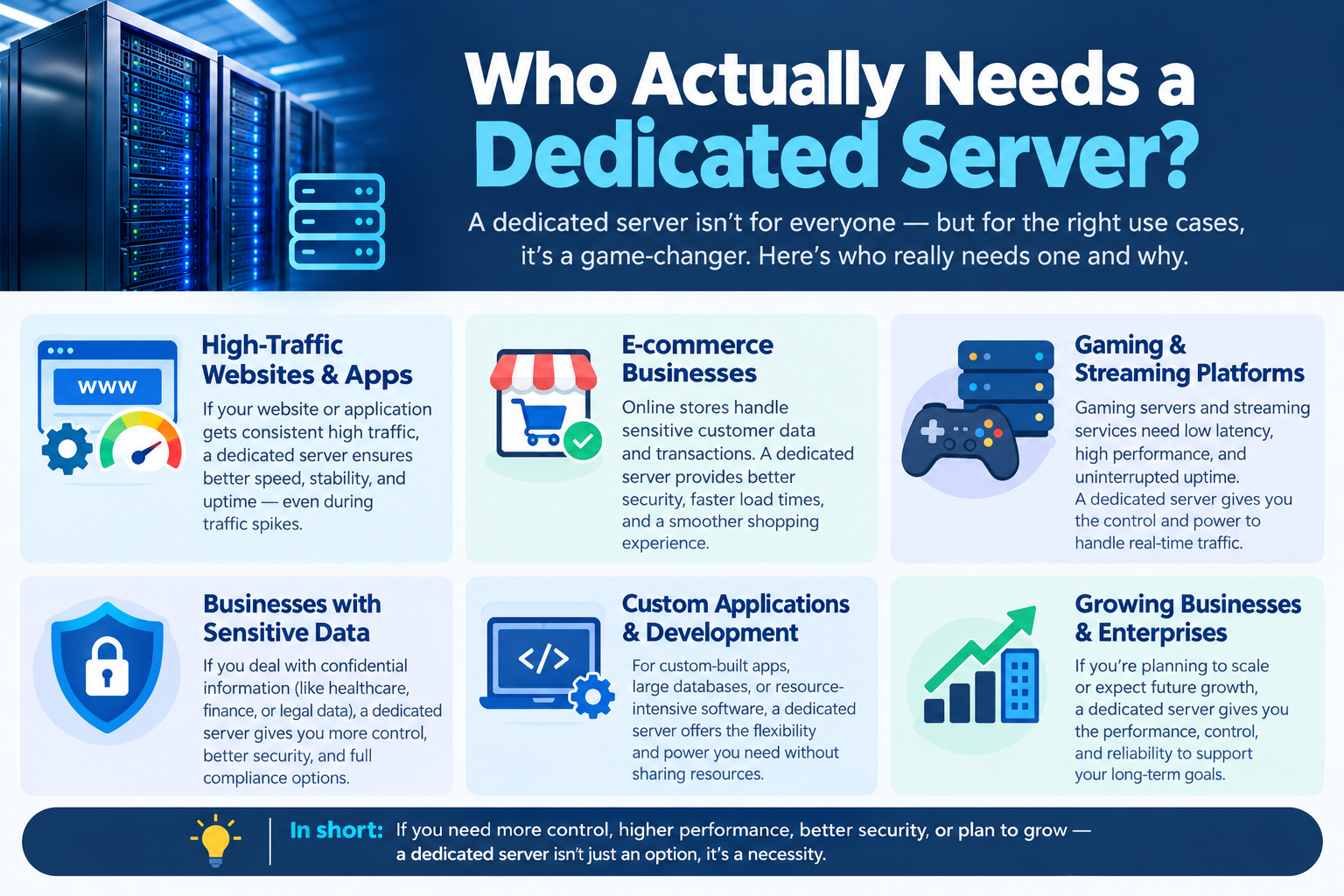
Not every website needs dedicated hardware. In fact, choosing a dedicated server before your workload justifies it can unnecessarily increase infrastructure costs.
Therefore, the decision should be based on actual resource consumption rather than company size.
High-Traffic Websites and Blogs
A content-heavy WordPress or CMS website receiving roughly 50,000–100,000 monthly visitors may eventually outgrow a VPS, particularly if caching and CDN configuration have already been optimized.
A reasonable starting configuration could include:
- 4–8 CPU cores
- 16–32GB RAM
- NVMe SSD storage
- 1Gbps network connectivity
Nevertheless, these numbers aren’t universal. Application architecture, caching, database queries, plugins, and traffic patterns can significantly change actual requirements.
eCommerce Stores
For eCommerce, visitor count alone doesn’t determine server requirements.
Instead, concurrent users, checkout activity, inventory operations, database queries, payment processing, and background jobs can create substantially higher resource demand.
A store processing hundreds of orders per day may benefit from:
- 8+ CPU cores
- 32GB or more RAM
- Fast NVMe or enterprise SSD storage
- RAID protection
- Reliable network connectivity
For an online store, infrastructure reliability matters because downtime during checkout can directly translate into lost revenue.
Startups and Development Teams
Development teams often need dedicated infrastructure for reasons other than website traffic.
For example, a dedicated server can host production workloads, staging environments, CI/CD processes, databases, containers, and internal services on the same physical machine.
A mid-range configuration with 6–8 CPU cores and 32GB RAM can be a useful starting point for smaller teams. However, the final configuration should always be based on actual application requirements.
Agencies Hosting Multiple Client Websites
Agencies managing numerous WordPress, Drupal, or other CMS websites may eventually find that maintaining many small VPS instances becomes difficult to manage.
A well-configured dedicated server with containers or virtual machines can consolidate workloads while maintaining resource separation between clients.
However, consolidation should be approached carefully. One physical server also becomes a larger single point of failure. Therefore, redundancy, backups, monitoring, and disaster recovery become especially important.
Gaming Servers
Gaming workloads often depend heavily on latency, network quality, and CPU single-thread performance.
A high-core-count CPU isn’t automatically better for every game server. In fact, many game engines depend heavily on single-thread performance, making CPU architecture and clock speed important considerations.
Likewise, low network latency and a reliable uplink can matter just as much as hardware specifications.
AI and Machine Learning Workloads
AI and ML are increasingly important dedicated server workloads.
Model training and inference can require GPU acceleration, large amounts of RAM, high-speed NVMe storage, and substantial network capacity for moving datasets.
GPU-equipped dedicated servers may include hardware such as NVIDIA GPUs designed for compute-intensive workloads. However, the appropriate GPU depends on model size, inference requirements, training workload, VRAM requirements, and software compatibility.
If you’re unsure what configuration your workload requires, getting a professional sizing recommendation can prevent you from paying for hardware you don’t actually need.
Matched your workload to a dedicated server tier? See [available server plans] or [get a free sizing recommendation] if you want a second opinion before choosing your configuration.
How Much Does Dedicated Server Hosting Cost?
Advertised prices for dedicated server hosting are often only the starting point. The actual cost can be higher once management, backups, IP addresses, bandwidth, and other services are included.
Typical price ranges include:
- Entry-level: 4 cores, 16–32GB RAM, single SSD — approximately $80–$150/month
- Mid-tier: 8 cores, 32–64GB RAM, RAID-protected SSD/NVMe — approximately $150–$350/month
- High-performance: 16+ cores, 128GB+ RAM, NVMe and potentially GPU — approximately $400–$800+/month
Prices vary significantly depending on CPU generation, RAM, storage, bandwidth allocation, data center location, support level, and contract terms.
Additional Dedicated Server Costs
When comparing providers, don’t look only at the monthly headline price.
Consider:
- Setup fees: Some providers charge a one-time provisioning fee.
- Bandwidth overages: High-traffic websites and media applications can exceed included transfer limits.
- IP addresses: Additional IPv4 addresses may cost extra.
- Remote management: IPMI or remote console access may or may not be included.
- Managed support: Administration and monitoring can add significant monthly costs.
- Backups: Off-server backup storage is often billed separately.
- RAID: Hardware or software RAID configurations can affect the final price.
Dedicated Server Total Cost of Ownership
For a mid-tier workload, a rough 12-month comparison might look like:
- Dedicated server with management: approximately $250/month × 12 = $3,000/year
- VPS cluster with comparable capacity: approximately $180/month × 12 = $2,160/year
- Cloud infrastructure: highly variable depending on compute, storage, bandwidth, egress, and load balancing
The cheapest monthly price isn’t necessarily the cheapest infrastructure.
Therefore, a business should consider administration time, downtime risk, migration costs, backups, support, and scaling requirements when calculating total cost of ownership.
Managed vs Unmanaged Dedicated Server
Choosing between managed and unmanaged infrastructure can have a major effect on the amount of technical work your team needs to handle.
A managed dedicated server means the provider handles some or most server administration tasks on your behalf.
Depending on the plan, this can include:
- Operating-system updates
- Security patching
- Server monitoring
- Basic troubleshooting
- Backup management
- Hardware replacement
- Security configuration
- Technical support
However, the exact scope varies by provider. Therefore, always check what “managed” actually includes before purchasing.
What Is an Unmanaged Dedicated Server?
With an unmanaged server, you generally receive the hardware, network connection, operating system options, and administrative access, while your team handles server administration.
That means you’re responsible for:
- Installing and configuring software
- Firewall configuration
- Security updates
- Monitoring
- Application troubleshooting
- Backup configuration
- Performance optimization
Unmanaged infrastructure can be an excellent choice if you have experienced developers or system administrators.
On the other hand, if nobody on your team wants to troubleshoot a production server at 2 a.m., paying for a managed dedicated server can be a sensible business decision.
Dedicated Server Specifications to Look For
CPU
CPU requirements depend on the workload.
More cores are useful for parallel workloads such as multiple applications, containers, background jobs, and concurrent requests.
Meanwhile, clock speed and single-thread performance become particularly important for applications that don’t scale efficiently across many CPU cores.
Therefore, don’t choose a CPU based solely on core count. Look at processor generation, architecture, clock speed, cache, power requirements, and workload compatibility.
RAM
RAM requirements vary considerably.
As a broad starting point:
- 16GB: Smaller websites and applications
- 32GB: eCommerce, SaaS, and multi-site workloads
- 64GB+: Large databases, caching systems, virtualization, and many AI workloads
Ultimately, monitoring actual memory consumption is better than relying on generic recommendations.
Storage
NVMe SSD storage is generally the preferred choice for performance-sensitive workloads in 2026.
NVMe drives provide substantially higher I/O performance than traditional spinning hard drives and can improve database, application, and file-processing workloads.
RAID can add redundancy depending on the configuration.
For example:
- RAID 1: Mirrors data across two drives
- RAID 10: Combines mirroring and striping
- RAID 5: Provides redundancy with distributed parity
However, RAID is not a replacement for backups. It primarily helps maintain availability when a drive fails.
Network
Network capacity is another important consideration.
Check:
- Port speed
- Included bandwidth
- Transfer limits
- Traffic policies
- Network redundancy
- DDoS mitigation
- Guaranteed versus burstable bandwidth
For example, a guaranteed 1Gbps connection and a burstable 1Gbps connection are not necessarily equivalent in real-world use.
Data Center Location
Choose a data center close to your primary users whenever possible.
Physical distance affects latency, which can be especially important for gaming, financial applications, APIs, and interactive services.
Furthermore, data residency can matter. Organizations subject to regulations or contractual requirements should verify where data is physically stored and processed.
Dedicated Server Security and Compliance
A dedicated server gives you extensive control. However, that control comes with responsibility.
A basic server-hardening process should include:
- Disable password-based SSH authentication where appropriate
- Use SSH keys and strong administrative credentials
- Configure a firewall
- Open only required network ports
- Keep the operating system patched
- Use intrusion-prevention tools such as fail2ban where appropriate
- Monitor system health and availability
- Review user permissions regularly
- Maintain reliable backups
DDoS Protection
DDoS protection should be evaluated before purchasing infrastructure rather than after an attack happens.
Some providers include basic mitigation, while others offer it as an additional service.
Ask providers:
- What type of attacks are covered?
- Is mitigation automatic?
- Is there a traffic threshold?
- Is the service included?
- Is traffic filtering performed upstream?
Compliance
Dedicated infrastructure can make certain compliance and data-governance conversations easier because the organization has greater control over the physical environment.
However, dedicated hardware alone does not make a system PCI-DSS, HIPAA, or GDPR compliant.
Compliance depends on the entire environment, including software, access controls, encryption, policies, logging, personnel, backups, and operational procedures.
For regulated workloads, verify the provider’s actual certifications, contractual commitments, and compliance documentation rather than relying on marketing claims.
For additional cybersecurity guidance, review the NIST Cybersecurity Framework and PCI Security Standards Council resources. These are useful authoritative references when evaluating security controls and payment-data requirements.
Backups
RAID protects against certain hardware failures. However, it doesn’t protect against accidental deletion, ransomware, malicious activity, or a bad software deployment.
Therefore, keep at least one backup copy off the server, preferably in a separate physical or cloud location.
A reliable backup strategy should also include regular restoration testing. After all, a backup that has never been tested may not be recoverable when you actually need it.
How to Migrate to a Dedicated Server
Migrating to dedicated infrastructure doesn’t have to cause significant downtime, but preparation matters.
1. Audit Your Existing Resources
Before ordering hardware, monitor:
- CPU usage
- RAM usage
- Storage consumption
- Disk I/O
- Network traffic
- Database performance
- Peak traffic periods
Use actual measurements instead of assumptions.
2. Build the New Environment
Configure the new server while the existing environment remains online.
Install the operating system, applications, databases, security tools, SSL certificates, firewall rules, monitoring, and backup systems.
3. Lower DNS TTL
A few days before migration, reducing DNS TTL can help DNS changes propagate faster.
However, don’t assume every DNS resolver will honor the new TTL instantly. Nevertheless, lowering it in advance can reduce the duration of stale DNS records.
4. Test Before Cutover
Run functional tests and, where appropriate, controlled load tests.
Check:
- Website functionality
- Login systems
- Payment processing
- Database connections
- Cron jobs
- APIs
- SSL certificates
- File permissions
- Monitoring
- Backups
5. Perform the DNS Cutover
Once the new environment has been tested, update DNS records to point traffic toward the new server.
Keep the old server available during the transition so you have a fallback if unexpected problems occur.
6. Monitor After Migration
Don’t immediately cancel the old environment.
Instead, monitor performance, errors, traffic, database behavior, and application logs after migration.
Provisioning a server in two hours doesn’t mean the entire migration can safely be completed in two hours. Data transfer, configuration, testing, and validation require additional time.
How to Choose a Dedicated Server Provider
Every provider can make its infrastructure sound impressive. Therefore, the better approach is to compare measurable factors.
SLA and Uptime
Check the actual SLA rather than relying on phrases such as “24/7 reliability.”
Look for:
- Guaranteed uptime
- Response times
- Hardware replacement commitments
- Service credits
- Support escalation procedures
Network Redundancy
Ask whether the data center has multiple upstream network providers.
Network redundancy can reduce the impact of a single carrier outage. As a result, it can improve overall infrastructure resilience.
Data Center Certifications
Review the provider’s data center certifications and infrastructure standards.
ISO 27001, SOC reports, and Tier classifications can be relevant depending on your business requirements. Nevertheless, a certification alone doesn’t guarantee application-level security.
Hardware Replacement
Find out what happens if:
- A drive fails
- A memory module fails
- A power supply fails
- The server becomes unavailable
Ask how quickly replacement hardware is provided and whether the provider guarantees a specific response time.
Contract Flexibility
Review:
- Monthly versus annual billing
- Cancellation terms
- Setup fees
- Renewal pricing
- Migration assistance
- Hardware upgrade policies
A low introductory price isn’t necessarily a good deal if renewal pricing is substantially higher.
Support Channels
Evaluate available support channels, including ticketing, live chat, phone support, emergency escalation, and technical assistance.
One useful test is to contact support before becoming a customer and ask a real technical question.
The quality, speed, and accuracy of the response can tell you a lot about what support will be like after purchase.
A Practical Approach to Server Selection
Choosing server infrastructure isn’t simply a matter of selecting the biggest CPU or the most RAM.
Our approach focuses on practical infrastructure considerations that affect real-world server performance and reliability, including CPU utilization, memory requirements, storage I/O, network capacity, application architecture, security hardening, backups, migration planning, and total cost of ownership.
We also recognize that server specifications cannot be applied universally. A WordPress website, eCommerce store, database server, gaming server, and AI workload can have completely different resource requirements.
That’s why the recommendations in this guide are presented as starting points rather than guarantees. Actual production requirements should be validated against real resource usage, traffic patterns, application behavior, and performance testing.
This workload-first approach helps businesses avoid two common mistakes: purchasing more hardware than they need or choosing an undersized server that becomes a performance bottleneck soon after deployment.
Frequently Asked Questions
Dedicated Server vs VPS — What’s the Actual Difference?
A VPS is a virtual server running on shared physical infrastructure, while a dedicated server gives one customer the entire physical machine.
A VPS can be more affordable and flexible. However, a dedicated server provides greater physical resource control and predictable performance for sustained workloads.
Is Dedicated Server Hosting Worth It for a Small Business?
It depends on the workload rather than the size of the business.
A small company running a resource-intensive application, database, or high-traffic eCommerce store may benefit from dedicated infrastructure. Conversely, a small brochure website with modest traffic will usually be better served by shared hosting or a VPS.
How Long Does It Take to Set Up a Dedicated Server?
Basic hardware provisioning can sometimes take only a few hours. However, a complete production migration can take several days or longer because configuration, testing, DNS changes, data migration, and validation are separate steps.
Can I Upgrade a Dedicated Server Later?
Usually, yes, but dedicated hardware upgrades aren’t as instant as resizing a cloud instance.
Depending on the provider and hardware, upgrades may involve adding RAM or storage, replacing components, or migrating to a new physical server.
Do I Need Technical Skills to Manage a Dedicated Server?
You generally need technical knowledge for an unmanaged server because you’ll be responsible for administration and security.
With a managed dedicated server, the provider can handle many operating-system and infrastructure tasks. Therefore, the technical burden on your team can be significantly reduced.
How Secure Is a Dedicated Server Compared With Cloud Hosting?
Both dedicated and cloud infrastructure can be highly secure when properly configured.
A dedicated server gives you direct control over the physical machine and avoids physical multi-tenancy on that server. Nevertheless, security still depends on patching, access controls, firewall configuration, monitoring, encryption, backups, and application security.
Which Dedicated Server Actually Fits You?
The best dedicated server isn’t necessarily the one with the largest CPU, the most RAM, or the highest monthly price.
Instead, it’s the configuration that matches your actual workload.
A small website receiving a few thousand visitors per month probably doesn’t need 64GB of RAM and a high-end CPU. On the other hand, an eCommerce platform processing hundreds of daily orders, a database-heavy application, or an AI workload may quickly outgrow a basic VPS.
Therefore, start with your actual CPU, RAM, storage, bandwidth, and application requirements. Then compare providers based on hardware, network quality, support, backups, security, SLA terms, and total cost rather than headline pricing alone.
Not sure exactly where you land? Talk to one of our server engineers for a free configuration recommendation based on your actual traffic and workload, not a generic tier.
If you already know roughly what you need, you can see our [current server plans and pricing] and get provisioned right away.