
If you’ve spent even ten minutes searching “cheap VPS,” you already know the problem: every result is a company trying to sell you their VPS. Nobody’s actually explaining what you’re buying, what “cheap” costs you a year from now, or which of the dozen budget providers out there is right for your specific project.
That’s what this guide is for. No affiliate pitch, no “buy now” button until the very end. Just a straight answer to the question you actually came here with: how do you get a genuinely cheap, affordable VPS that doesn’t turn into an expensive mistake?
What “Cheap VPS” Really Means (And What You’re Trading Off)
A VPS — virtual private server — is a slice of a physical server that’s walled off just for you.
Unlike shared hosting, where your site sits on the same box as hundreds of others fighting for the same CPU, a VPS gives you dedicated resources and root access.
Unlike a dedicated server, you’re not paying for an entire physical machine, so the price drops dramatically.
If you’re comparing VPS vs. shared hosting, the biggest difference is control, isolation, and the amount of resources available to your application.
VPS Virtualization Types
“Cheap” enters the picture because of two different ways providers slice up that physical server: KVM virtualization and OpenVZ/LXC (container-based) virtualization. KVM gives you a genuinely isolated virtual machine with your own kernel — closer to a real server. OpenVZ/LXC shares the host kernel across multiple containers, which is cheaper to run but means you’re more exposed to what your “neighbors” are doing.
This is where the real trade-off in cheap VPS lives: a $3/month container VPS and a $6/month KVM VPS can look identical on a spec sheet and perform completely differently under load.
The Hidden Risk of Oversubscription
The other thing nobody tells you upfront is oversubscription. Budget providers make money by fitting more customers onto the same physical hardware than the specs technically allow, betting that most people won’t use their full allocation at the same time. Most of the time this works fine. Occasionally — usually during a traffic spike, which is exactly when you need your server to perform — you get “noisy neighbor” problems: your site slows down because someone else on the same box is hammering the CPU.
The Hidden Cost of “Cheap” VPS — Real Total Price Breakdown
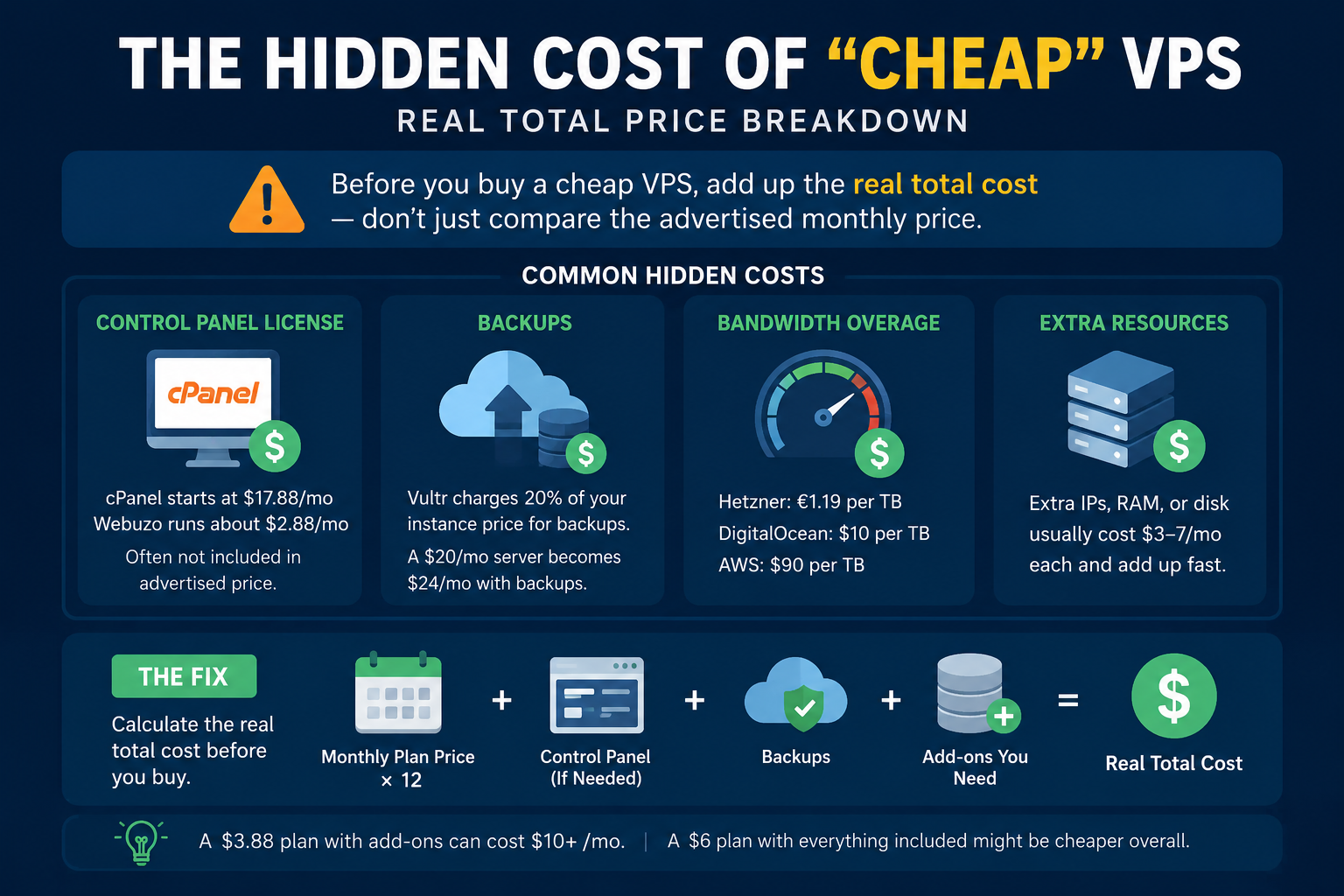
Before you buy a cheap VPS, add up the real total cost rather than comparing only the advertised monthly price. The headline number may not include backups, a control panel, extra storage, or other services you’ll eventually need.
Renewal Pricing
Here’s a real example. Namecheap advertises its entry-level VPS plan, Spark, at $3.88/month — but that’s the yearly-billed intro rate.
Read the fine print and it renews at $58.56 for the year, which works out to $4.88/month ongoing. Not a huge jump, but it’s already 26% more than the number in the headline.
Common VPS Add-On Costs
Now stack the add-ons that most buyers assume are included but aren’t.
Control Panel License
A control panel license is not always included in the advertised VPS price. If you need cPanel, Webuzo, or another control panel, check whether the provider includes the license or charges it separately each month.
Backup Costs
Backups are another common add-on that buyers often assume is included. Vultr, for example, charges backups at 20% of your instance’s base price. A $20/month server becomes $24/month when you turn backups on. For most business websites and important applications, reliable backups are worth including in your budget.
Bandwidth Overage
Bandwidth overage charges vary widely by provider. Hetzner includes a generous 20 TB/month on its EU plans and charges roughly €1.19 per TB beyond that.
DigitalOcean’s overage is about $10 per TB. AWS, by comparison, can charge around $90 per TB. Therefore, a VPS that looks cheap at first can become considerably more expensive when your traffic increases.
Extra IPs, RAM, and Disk
Additional IP addresses, RAM, and disk space are usually relatively inexpensive individually, often costing around $3–7 per month depending on the provider and configuration. However, these costs can add up quickly if your initial VPS plan is undersized.
Calculate the Real VPS Cost
The fix is simple: before you buy a cheap VPS, calculate the monthly plan price × 12, then add the control panel license, backups, and any other add-ons you know you will need. Compare that total annual cost across providers rather than comparing only the advertised starting price.
For example, a $3.88/month VPS with backups, a control panel, and other required add-ons can cost significantly more than the banner price suggests.
before you buy a cheap VPS, add up (monthly plan price × 12) + control panel + backups + any add-on you know you’ll need, and compare that number across providers — not the banner price.
A $3.88 plan with backups and cPanel can easily land north of $10/month, while a $6/month KVM plan with everything included might actually be cheaper overall.
If you want to buy this plan, click here to explore our [High-Performance VPS Hosting Plans] and find your perfect match.
Cheap vs. Affordable vs. High-Performance VPS — What’s the Difference?
These three terms get used interchangeably in marketing copy, but they’re not the same thing, and knowing the difference will save you from either overpaying or underbuying.
Cheap means the lowest sticker price you can find, usually on entry-tier resources (1 vCPU, 1 GB RAM). It’s genuinely useful for testing, learning, or a very low-traffic personal project — and genuinely risky for anything customer-facing.
Affordable VPS is the sweet spot most people searching this topic actually want: the best performance you can get for a reasonable price, not necessarily the lowest price on the page. A $6–12/month plan with a real KVM virtual machine, NVMe storage, and decent bandwidth is usually the “affordable” tier, and it’s where most small business sites and side projects should land.
High-performance VPS means dedicated (not shared) vCPU cores, NVMe SSD storage, and beefier network allocations — built for sites with real traffic, apps doing heavy computation, or workloads where a slow server directly costs you money (checkout pages, APIs, SaaS backends). You’ll pay more, but per-request cost often goes down because you’re not throttled.
A useful gut check: if your monthly traffic or workload would make a $6 VPS sweat, don’t buy the $6 VPS and hope. Buy the $15–25 plan and stop thinking about it.
How to Choose the Right Cheap VPS by Use Case
Cheap VPS means something different depending on who’s buying it.
The right choice depends on your traffic, software, technical experience, and how much performance you actually need.
For Small Websites & Blogs
You want ease over raw power: a control panel (cPanel or Webuzo) for one-click WordPress installs, automatic OS patching if you’re not comfortable in a terminal, and 2–4 GB of RAM, which comfortably handles a WordPress site with moderate traffic.
If you’re not ready to manage a server yourself, a managed VPS tier (Namecheap’s Basic or Complete management, for instance) is worth the extra $10–25/month — it buys you someone else fixing things at 2 a.m. This can be a better option than choosing the absolute cheapest VPS when you don’t have server administration experience.
For Developers & Startups
Developers usually don’t need a control panel, so skip it — it’s overhead you don’t need and one more piece of software that can get compromised. Look for root access, SSH key authentication, snapshot/rollback support, and a provider with a clean API or CLI so you can script deployments.
For developers who prefer an unmanaged VPS, the lower monthly cost can be attractive because you control the operating system, software stack, and server configuration yourself. Hetzner and Vultr are popular here specifically because their per-spec pricing is aggressive and neither forces a panel on you.
A 2 vCPU / 4 GB instance running your API or staging environment can cost anywhere from about €4.50/month on Hetzner to $18–24/month on DigitalOcean for the same specs —
the gap is entirely about brand, ecosystem, and support depth, not raw compute.
If your app is compute-heavy, this is where a high-performance VPS with dedicated cores earns its keep. The extra cost can be worthwhile when CPU performance directly affects application response times.
For eCommerce Owners
This is one place where “cheapest” is the wrong goal. You need consistent uptime (a slow checkout page directly costs sales), a dedicated IP for your SSL certificate, and enough headroom to survive a traffic spike during a sale without the site crawling.
For an online store, an affordable VPS tier is usually a better choice than the smallest cheap VPS available. During flash sales or seasonal traffic spikes, a high-performance VPS can provide the additional CPU, RAM, and storage performance needed to keep checkout and database operations responsive.
Budget for backups from day one — losing order data to a failed disk with no backup is the kind of mistake that ends a store.
For Agencies & Resellers
You’re likely hosting multiple client sites, so look for reseller-friendly billing (WHMCS support), white-label control panels, and enough RAM/CPU headroom to isolate clients from each other so one site’s traffic spike doesn’t take down another client’s site.
Bulk or reseller pricing tiers exist specifically for this and are usually a better deal than stacking individual VPS plans.
For Forex/Trading or Latency-Sensitive Use
This is a genuinely different product. You need a data center physically close to your broker’s servers (London, New York, Amsterdam are common), extremely low latency rather than raw specs, and usually Windows with MetaTrader support.
Providers like CheapVPS.co specialize specifically in this niche with locations chosen for exchange proximity rather than general-purpose hosting value. If your trading software depends heavily on latency, location should be considered before choosing a cheap VPS based only on price.
Cheap VPS Hosting Comparison — Best Providers by Budget (2026)
If you’re comparing VPS hosting plans, don’t look only at the starting price. The provider’s included resources, bandwidth, storage, virtualization, and upgrade options all affect the actual value of the server.
Here are current entry-level pricing examples across providers people commonly compare when searching for an affordable VPS solution. Prices are approximate and change frequently — always confirm at checkout.
| Provider | Starting Price | Specs (entry) | Bandwidth | Panel Included? | Best For |
| Hetzner Cloud | ~€5.49/mo (CX23) | 2 vCPU / 4GB / 40GB NVMe | 20 TB (EU) | No | Best raw price-to-performance, EU-based |
| Vultr | $3.50–5/mo | 1 vCPU / 1GB SSD | 1–2 TB | No | Fast deployment, 32+ global locations |
| DigitalOcean | ~$18/mo (2 vCPU/2GB) | Standard Droplet | 2 TB then $0.01/GB | No | Best docs/tutorials, beginner-friendly devs |
| Contabo | Budget-tier from ~€4–6/mo | Varies, AMD EPYC hardware | 32 TB outbound | Optional | High RAM/disk-per-dollar |
| Namecheap VPS | $3.88/mo intro ($4.88 renewal) | 1 vCPU / 1GB / 20GB SSD | 1 TB | cPanel/Webuzo extra | Beginners wanting a panel |
| OVHcloud | ~$7.60/mo (VPS-1, post-2026 pricing) | Entry KVM plan | Varies by plan | No | European infrastructure, budget hosting |
For high-performance VPS workloads, providers such as Hetzner and DigitalOcean also offer higher-tier configurations, including dedicated-core or premium-performance options. These are better suited to applications where consistent CPU performance and faster storage matter more than the lowest possible monthly price.
A few honest notes on this table: Hetzner and Contabo consistently win on raw specs-per-dollar, especially for European traffic, but neither includes a control panel by default and support is lighter-touch than Namecheap or DigitalOcean. DigitalOcean and Namecheap cost more for the same specs but you’re paying for documentation, ease of use, and (with Namecheap) an actual panel bundled into the buying flow.
There’s no universally “best” cheap VPS — there’s the best one for what you’re building.
What to Check Before You Buy a Cheap VPS (Checklist)
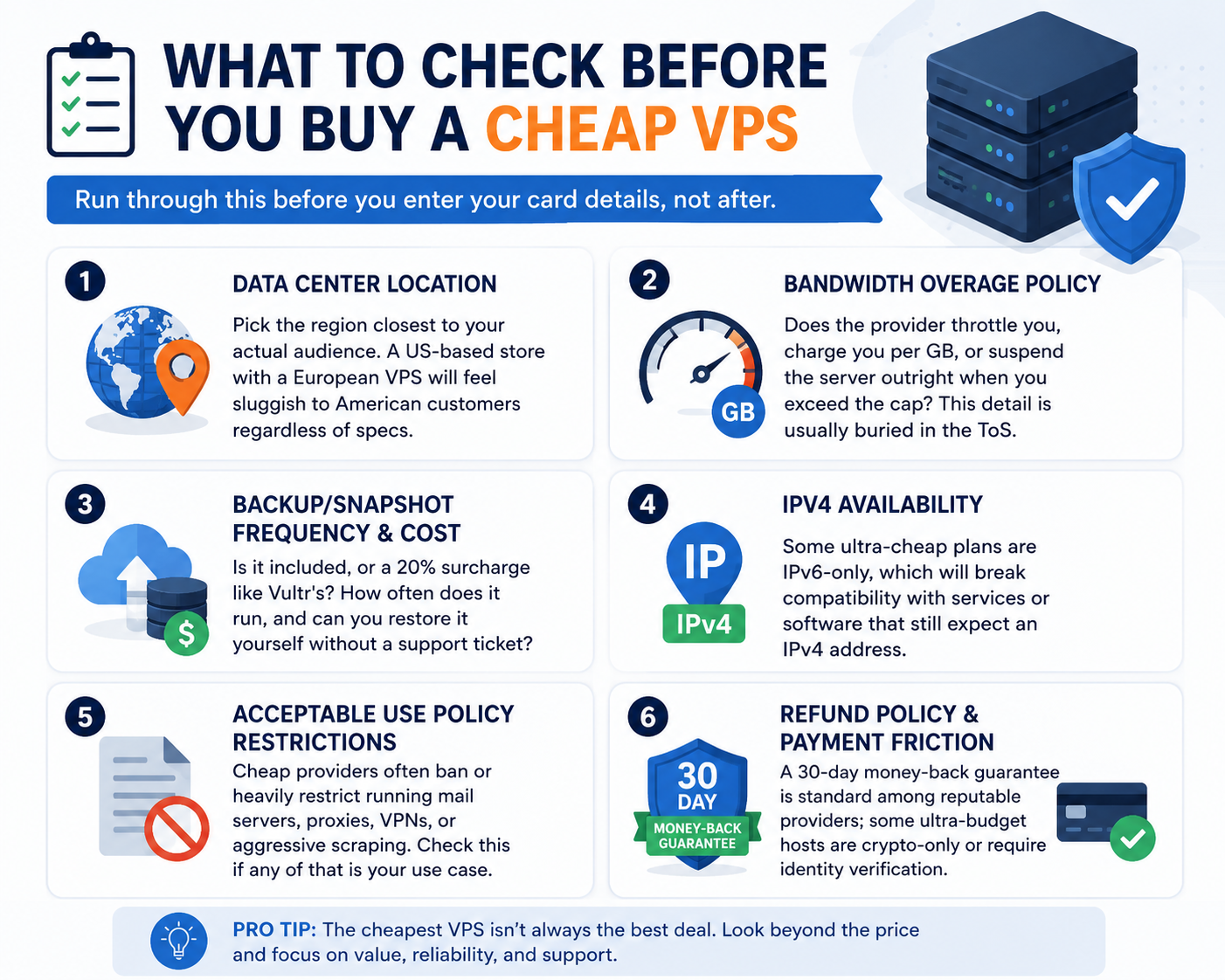
Run through this before you enter your card details, not after:
- Data center location — pick the region closest to your actual audience. A US-based store with a European VPS will feel sluggish to American customers regardless of specs.
- Bandwidth overage policy — does the provider throttle you, charge you per GB, or suspend the server outright when you exceed the cap? This detail is usually buried three pages deep in the ToS.
- Backup/snapshot frequency and cost — is it included, or a 20% surcharge like Vultr’s? How often does it run, and can you restore it yourself without a support ticket?
- IPv4 availability — some ultra-cheap plans are IPv6-only, which will break compatibility with services or software that still expect an IPv4 address.
- Acceptable Use Policy restrictions — cheap providers often ban or heavily restrict running mail servers, proxies, VPNs, or aggressive scraping. Check this if any of that is your use case.
- Refund policy and payment friction — a 30-day money-back guarantee is standard among reputable providers; some ultra-budget hosts are crypto-only or require identity verification that slows down getting started.
Setting Up Your Cheap VPS the Right Way (First-Hour Checklist)
A cheap VPS ships as a bare, unmanaged box — securing it is on you, not the provider. If you’re using an unmanaged VPS, these initial security steps are especially important.
- Generate an SSH key pair and use it to log in instead of a password.
- Disable root password login entirely once your SSH key works.
- Set up a basic firewall (ufw on Ubuntu is the simplest option) and only open the ports you actually need.
- Install fail2ban to auto-block repeated failed login attempts.
- Run your OS updates immediately — a fresh VPS image is often already a few security patches behind.
- Turn on automated backups or snapshots before you put anything important on the server, not after.
None of this takes more than 20 minutes, and it’s the difference between a “cheap VPS” and a cheap VPS that gets compromised in its first week.
High-Performance VPS — When to Upgrade From “Cheap”
You’ll know it’s time to move up a tier when you start seeing the symptoms of a server that’s out of room: pages loading noticeably slower under normal traffic, CPU “steal” showing up in your monitoring (a sign your host is oversubscribed and other tenants are eating your cycles), or your RAM usage sitting near 90% even on a quiet day.
At that point, the fix isn’t switching providers again — it’s moving to a high-performance tier: dedicated vCPU cores instead of shared, NVMe storage if you’re not already on it, and a plan with real headroom rather than one you’re maxing out just to keep the lights on.
A high-performance VPS is particularly useful for database-heavy applications, busy eCommerce stores, SaaS platforms, APIs, and workloads where consistent CPU performance matters.
It costs more per month, but it’s almost always cheaper than the lost revenue or support headaches from a server that can’t keep up.
Technical Authority: Our Systems Engineering and Benchmarking Background
Evaluating modern infrastructure isn’t just about comparing figures on a pricing page; it also requires understanding the underlying architecture behind those offers. At HelloServer, our deployment engineers and systems administrators work with multi-node network environments and server infrastructure on a daily basis.
We benchmark multi-tenant virtual environments, test network performance under demanding workloads, and monitor NVMe IOPS and other system metrics to assess how resources perform during periods of increased demand. Our recommendations are informed by practical server management, infrastructure testing, and systems deployment experience rather than pricing claims alone.
Real Infrastructure Insights: Cutting Through the Noise
When users search for cheap VPS options or budget-friendly instances, they can encounter hidden renewal costs, burstable resource limits, and oversold virtualization environments.
At HelloServer, we focus on architectural transparency and practical performance considerations when evaluating VPS solutions. Our technical assessments are based on infrastructure specifications, monitoring data, and hands-on server management experience rather than marketing claims alone.
By explaining CPU, RAM, storage, virtualization, and network configurations in clear terms, we help businesses choose a cheap VPS hosting solution that provides the right balance of cost, reliability, and performance for their workloads.
Frequently Asked Questions
Is cheap VPS hosting reliable?
Yes, when you choose a provider that uses proper KVM virtualization, publishes a real uptime track record, and you avoid stacking too many sites or apps on the smallest possible plan. Reliability problems with cheap VPS hosting almost always trace back to oversubscription or buying a plan that’s genuinely too small for the workload.
What’s the difference between VPS and cloud hosting?
In practice they overlap a lot. Traditional VPS hosting usually means a fixed-spec server you rent monthly; “cloud” hosting (like DigitalOcean Droplets or Hetzner Cloud) typically adds hourly billing, instant resizing, and easier snapshotting. Under the hood, both are virtual machines on shared physical hardware.
How much RAM/CPU do I need for a small business website?
For a standard WordPress or small business site with moderate traffic, 2 GB RAM and 2 vCPU cores is a comfortable starting point. Static or very low-traffic sites can run on 1 GB; sites running WooCommerce or heavier plugins should look at 4 GB and up.
Can I upgrade my VPS plan later?
Almost always, yes — most providers let you resize your plan from a dashboard without migrating to new hardware, though some require a brief reboot to apply the change. When comparing VPS hosting plans, always check the provider’s upgrade path before buying the smallest available option.
Is a cheap VPS good for eCommerce?
It can be, but treat “cheap” as a starting point, not the goal. Prioritize uptime, backups, and a dedicated IP over shaving a few dollars off the monthly price — the cost of downtime during a sale will dwarf the savings. For stores expecting regular traffic spikes, an affordable VPS or high-performance tier may be a better long-term choice.
Do I need cPanel with a VPS?
Only if you’re not comfortable managing a server from the command line. If you are, skip it — it’s a recurring cost and one more piece of software to secure. If you’re not, it’s worth the $15–18/month for the time it saves you.
When do I need a high-performance VPS instead of a standard one?
You should consider a high-performance VPS when your application consistently uses most of its CPU or RAM, experiences slow response times during traffic spikes, or depends on fast database and storage performance. It’s also a good choice for SaaS applications, busy eCommerce sites, APIs, and compute-heavy workloads where consistent performance matters more than saving a few dollars each month.
The Bottom Line
“Cheap VPS” isn’t a trap as long as you know exactly what you’re buying: the real renewal price, the virtualization type, the bandwidth policy, and whether the plan actually fits your use case.
For many users, an affordable VPS offers the better balance between price, performance, and reliability. The goal shouldn’t be to choose the smallest number on the pricing page, but to find a server that gives you enough resources without paying for performance you don’t need.
Buy for your workload, not for the smallest number on the pricing page, and an affordable VPS can genuinely be a great VPS.
Ready to Find Your Fit?
Compare our current cheap, affordable, and high-performance VPS plans side by side and choose the server that fits your workload and budget.