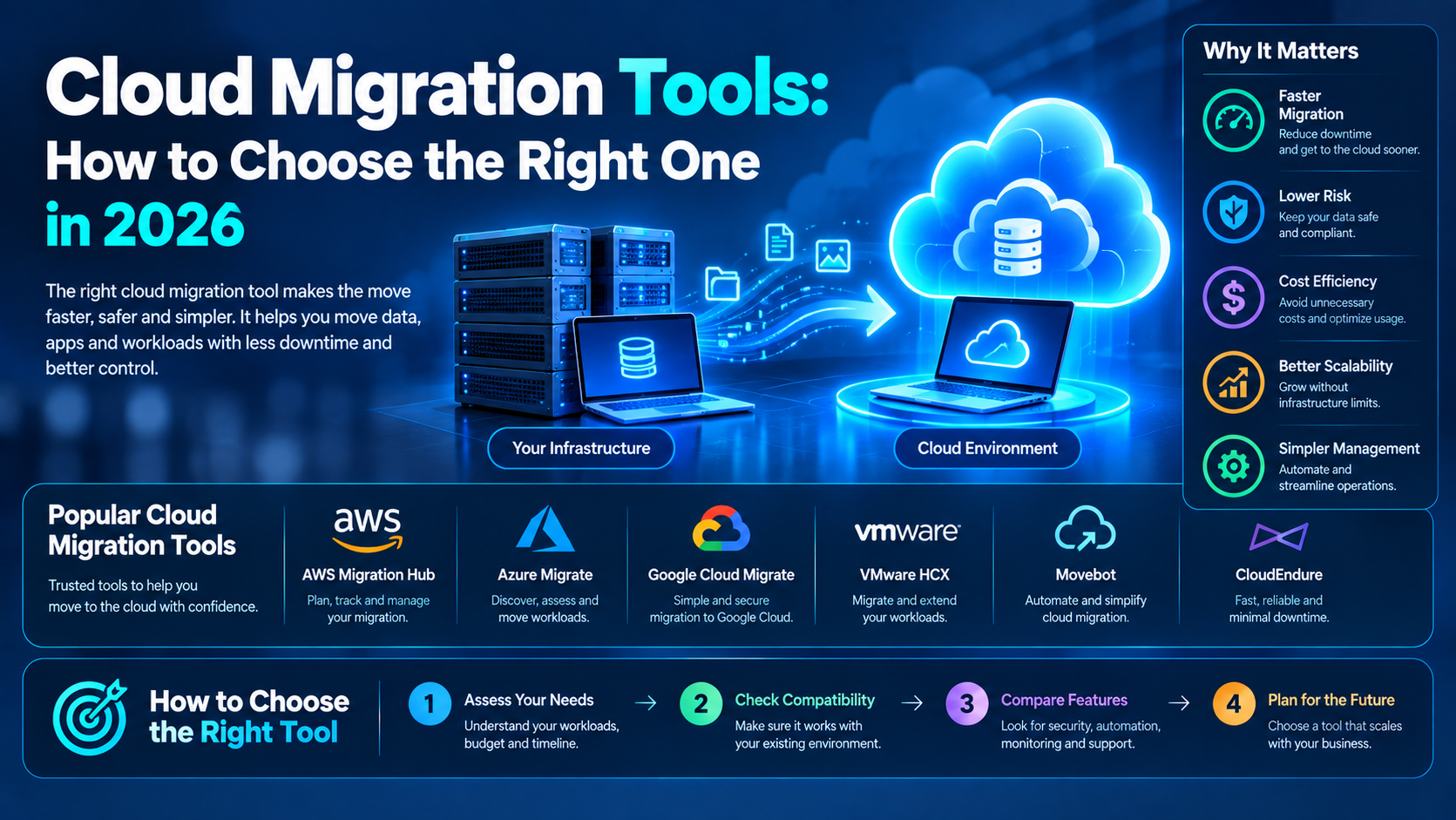
If you’ve searched for cloud migration tools, you’ve probably seen many lists comparing AWS, Microsoft Azure, Google Cloud, and third-party migration platforms. However, simply knowing the names of different tools does not tell you which solution is right for your website, store, application, or business.
For example, a 12-person agency migrating five client websites has very different requirements from a solo developer moving a Django application from a small VPS.
Therefore, choosing the right migration solution starts with understanding your workload, technical requirements, data volume, budget, and acceptable downtime.
In this guide, we’ll explain how different cloud migration tools work, which types of migrations they support, what costs you should consider, and how to avoid common problems such as data loss, broken applications, and unexpected downtime.
What Are Cloud Migration Tools?
Cloud migration tools are software solutions and services that help move websites, applications, databases, files, servers, virtual machines, and other workloads from one environment to another.
For instance, you might move an application from an on-premises server to a cloud environment. Alternatively, you could transfer a workload from one cloud provider to another hosting platform.
In simple terms, migration software can make the process more organized than manually copying files and configuring everything from scratch.
How Do Cloud Migration Tools Work?
Depending on the platform, migration tools may provide several capabilities, including:
- Data transfer
- Server replication
- Database migration
- File synchronization
- Application discovery
- Dependency analysis
- Migration testing
- Error detection
- Workload replication
- Final cutover support
As a result, the right tool can reduce repetitive manual work and provide better visibility during a complex migration.
When Do You Need Cloud Migration Tools?
Not every project requires dedicated migration software.
For example, if you’re running a small WordPress website with a few pages and a simple database, your new hosting provider’s migration service may be enough.
However, dedicated cloud migration tools become more useful when your environment includes:
- A live database
- Large amounts of customer data
- Multiple servers
- Custom applications
- Complex dependencies
- Strict uptime requirements
- Large file volumes
- Continuous data replication
Therefore, the more complicated your infrastructure becomes, the more useful a structured migration solution can be.
When You May Not Need a Migration Tool
For a basic website, you may only need to export your database, transfer your website files, configure the new server, update DNS records, and test the website.
Similarly, a small static website may be moved manually without specialized migration software.
However, you should carefully evaluate the risks before choosing a manual approach, especially if the website handles customer information, transactions, or business-critical data.
Types of Cloud Migration
Before comparing cloud migration tools, it is important to understand your overall migration strategy.
Cloud teams commonly use the “6 Rs” framework to describe different migration approaches. However, five approaches are particularly relevant for many websites, applications, and businesses.
Rehosting: The Lift-and-Shift Approach
Rehosting means moving an application or server to a new environment without making significant changes to its architecture or code.
For example, an agency might move a client’s WooCommerce website from shared hosting to a cloud VPS while keeping the application architecture largely unchanged.
This approach is often simpler because the application requires fewer modifications.
As a result, rehosting can be useful when the main objective is to move workloads quickly while minimizing application changes.
Replatforming: Move and Improve
Replatforming involves moving an application while making limited improvements during the process.
For example, a company could move a self-managed MySQL database to a managed cloud database service.
The application may remain largely unchanged. However, the organization can reduce some infrastructure management responsibilities.
Therefore, replatforming can provide improvements without requiring a complete application redesign.
Refactoring or Re-architecting Applications
Refactoring involves making significant changes to an application’s architecture.
For instance, a company might transform a monolithic application into containers or microservices to improve scalability and flexibility.
However, this approach normally requires more development, testing, and planning.
Consequently, refactoring is generally more appropriate when an application has specific scalability, performance, or architectural requirements.
Repurchasing Existing Software
Repurchasing means replacing an existing system with a different SaaS product.
For example, instead of migrating a self-hosted email server, a company could move its email operations to a managed service such as Google Workspace.
In this situation, the organization is not simply moving the existing infrastructure. Instead, it is replacing the existing solution with another service.
Retiring or Retaining Workloads
Not every workload needs to be migrated.
For example, an old staging environment, unused application, abandoned website, or outdated database may be a better candidate for retirement.
Similarly, some systems may need to remain in their current environment because moving them provides little practical benefit.
Therefore, identifying what should be migrated, retired, or retained should be part of your cloud migration checklist.
Cloud Migration Tools by Use Case
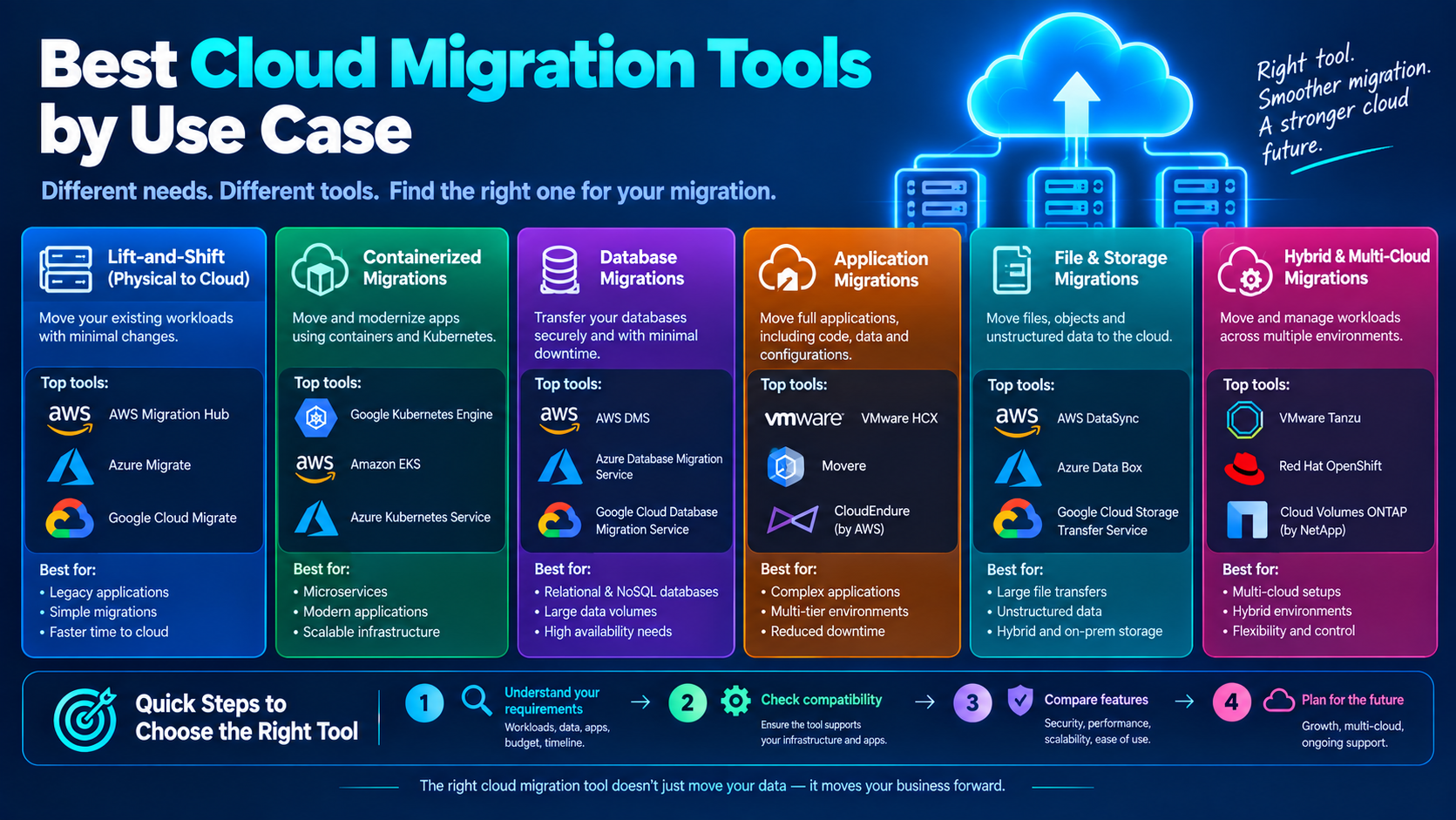
Different workloads require different migration capabilities. Therefore, rather than selecting a tool simply because it is popular, start by identifying exactly what you need to move.
Cloud Migration Tools for Websites
If you’re moving a website, your main concerns are usually downtime, database consistency, DNS configuration, SSL certificates, email delivery, and website functionality.
For smaller websites, many hosting providers offer migration plugins or managed migration services. These options can be enough for straightforward website transfers.
However, larger websites may require more advanced migration planning, particularly when they contain large databases, thousands of files, or multiple integrations.
During a website migration, pay particular attention to:
- DNS records
- MX records
- SSL certificates
- Database configuration
- Media files
- Website URLs
- 301 redirects
- Caching
- Contact forms
- Website performance
Most importantly, test these components before and after migration.
Cloud Migration Tools for WordPress and WooCommerce
WordPress migrations are common because websites frequently move between hosting providers as traffic and resource requirements increase.
A basic WordPress migration may involve transferring:
- WordPress files
- Themes
- Plugins
- Media uploads
- Database tables
- Configuration files
WooCommerce websites require additional care because customer orders and account information may continue changing during the migration.
Therefore, if your store is receiving orders while the migration is taking place, database synchronization and a carefully planned cutover become particularly important.
Cloud Migration Tools for eCommerce Stores
eCommerce migrations require additional testing because even a small configuration problem can affect customers.
Before switching traffic to the new environment, test:
- Product pages
- Shopping carts
- Checkout
- Payment gateways
- Customer login
- Order processing
- Email notifications
- Inventory updates
- SSL certificates
In addition, schedule the final cutover during a period when traffic and order volume are relatively low.
Cloud Migration Tools for Servers and Virtual Machines
Developers and system administrators often need to migrate servers or virtual machines to a cloud environment.
Native services such as AWS Application Migration Service (MGN), Azure Migrate, and Google Cloud’s Migrate to Virtual Machines are designed to support workload migration into their respective cloud environments.
These services can replicate source workloads and support controlled cutovers. Consequently, they can reduce the need for a long maintenance window.
However, compatibility remains important.
Before selecting a migration service, check whether it supports your:
- Operating system
- Hypervisor
- Source infrastructure
- Server configuration
- Application dependencies
- Storage requirements
For a straightforward server migration, preparation and testing may take only a few hours. More complex environments, however, can require considerably more planning.
Cloud Migration Tools for Database Migration
Database migrations require additional planning because applications may continue writing data while the migration is taking place.
Services such as AWS Database Migration Service, Azure Database Migration Service, and Google Cloud Database Migration Service can support data replication and controlled migration workflows.
However, transferring the data is only one part of the process.
Schema compatibility can become a significant issue when moving between database engines or versions.
You may also need to review:
- Stored procedures
- Database extensions
- User permissions
- Database versions
- Indexes
- Triggers
- Character sets
- Application connections
Therefore, perform a compatibility assessment before starting the production migration.
Cloud Migration Tools for Agencies
Agencies managing multiple client migrations can have different requirements from businesses moving a single website or server.
For example, an agency may need to transfer data between:
- Google Drive
- Microsoft SharePoint
- Dropbox
- Box
- Other SaaS platforms
In this situation, a specialized data migration platform may be more suitable than a traditional server migration service.
For agencies, useful features may include:
- Bulk migration
- Multi-user support
- Permission preservation
- Migration reporting
- Error logs
- Migration tracking
- Scheduling
- Data filtering
In addition, agencies should include software, infrastructure, testing, and labor costs when calculating the price of migration services for clients.
Cloud Migration Tools for SaaS Data
SaaS migrations can involve large amounts of files, users, permissions, and metadata.
For example, businesses may need to transfer information between cloud storage and collaboration platforms.
Therefore, check whether the selected migration platform can preserve:
- File structures
- User permissions
- Metadata
- Folder relationships
- Sharing settings
- Ownership information
Testing a small data set before beginning a full migration can help identify compatibility problems early.
Cloud Migration Tools for Containers and Kubernetes
Teams that have outgrown traditional virtual machines may consider moving workloads toward containers.
Tools such as Google Cloud’s Migrate to Containers and AWS App2Container can help organizations transition existing workloads toward containerized environments.
However, containerization introduces additional operational requirements.
You’ll need to consider:
- Container orchestration
- Networking
- Security
- Monitoring
- Logging
- Scaling
- Deployment processes
- Application dependencies
Therefore, don’t containerize an application simply because containers are popular.
Instead, your migration strategy should be based on actual technical and business requirements.
Free vs. Paid Cloud Migration Tools
The cost of cloud migration tools can vary significantly depending on the type and complexity of the migration.
Some native cloud migration services may not have a separate software license in certain scenarios. Nevertheless, you can still incur infrastructure, storage, networking, and data-transfer costs.
Third-party platforms, meanwhile, may use:
- Subscription pricing
- Data-volume pricing
- User-based pricing
- Usage-based pricing
- Custom enterprise pricing
However, the advertised tool price is only one part of your total cloud migration cost.
Free Cloud Migration Options
Some cloud providers offer migration services without a separate software license in particular scenarios.
Nevertheless, “free” does not necessarily mean that the entire migration costs nothing.
You may still pay for:
- Cloud servers
- Storage
- Data transfer
- Temporary infrastructure
- Backup storage
- Network usage
Therefore, always calculate the complete migration cost instead of focusing only on the software price.
Paid Cloud Migration Platforms
Third-party migration platforms may provide additional features such as automation, reporting, permission management, scheduling, and support.
However, pricing models vary considerably.
Some providers charge according to data volume, while others use subscription plans or custom enterprise pricing.
As a result, compare the pricing model with your expected migration size before making a decision.
Data Transfer and Egress Costs
Moving data out of an existing cloud provider can result in data-transfer or egress charges, depending on the provider and migration path.
Therefore, check the current pricing structure before starting a large migration.
Running Old and New Environments
During migration, you may need to operate both your old and new environments at the same time.
As a result, you could temporarily pay for two infrastructure environments while data is synchronized and tested.
Developer and Migration Labor Costs
Even if the migration software is free or inexpensive, someone still needs to:
- Configure the migration
- Monitor the transfer
- Test the destination
- Troubleshoot errors
- Verify data
- Complete the cutover
- Monitor the new environment
Consequently, labor costs can sometimes have a greater impact on the overall migration budget than the software itself.
How to Choose the Right Cloud Migration Tool
Before selecting from the many cloud migration tools available, evaluate the following factors.
Check Compatibility
First, check whether the migration solution supports your current:
- Operating system
- Hosting provider
- CMS
- Database
- Application
- Hypervisor
- Storage system
Always verify compatibility before starting a production migration.
Evaluate Downtime Requirements
Next, determine how much downtime your business can tolerate.
Can your website remain offline for several hours?
Or do you need a near-zero-downtime migration?
The answer can significantly influence the migration method and tool you select.
Consider Data Volume
Moving a few gigabytes of website files is very different from transferring multiple terabytes of application or database data.
For larger migrations, you may need:
- Incremental transfers
- Continuous replication
- Parallel transfers
- Specialized infrastructure
Therefore, estimate your total data volume before choosing a solution.
Assess Your Team’s Technical Skills
A graphical migration interface may be more convenient for a small business owner completing a one-time website migration.
On the other hand, developers may prefer solutions that provide:
- APIs
- CLI access
- Automation
- Scripts
- Integration capabilities
As a result, your team’s technical experience should influence your choice.
Review Security and Compliance
Security should also be considered before selecting migration software.
For example, organizations handling payment information, customer information, or other sensitive business data may have additional security and compliance requirements.
Review encryption, access controls, authentication, logging, and data-handling practices before migrating production data.
Calculate the Total Cloud Migration Cost
Finally, don’t look only at the migration tool’s license price.
Instead, calculate the complete cloud migration cost, including:
- Data transfer
- Storage
- Temporary infrastructure
- Software licenses
- Developer hours
- Testing
- Monitoring
- Potential downtime
This gives you a more realistic migration budget.
Common Cloud Migration Mistakes
Even reliable cloud migration tools cannot compensate for poor planning.
Fortunately, many common migration problems can be reduced through proper preparation.
Underestimating DNS Propagation
DNS changes may not appear everywhere immediately.
Therefore, review your DNS TTL settings before migration and plan your cutover carefully.
Skipping a Staging Migration
Whenever possible, test the destination environment before moving production traffic.
A staging migration can reveal:
- Broken plugins
- Missing environment variables
- Permission problems
- Database connection errors
- Incorrect application settings
- Missing files
This gives you an opportunity to fix problems before they affect users.
Failing to Create a Rollback Plan
Don’t immediately delete your old environment after migration.
Instead, keep a reliable rollback option until you’ve confirmed that the new environment is stable.
This is particularly important for websites and applications that handle transactions.
Migrating During Peak Traffic
For an eCommerce website, migration during a high-traffic period can increase the impact of unexpected problems.
Therefore, whenever possible, schedule the final cutover during a lower-traffic period.
Forgetting SEO Redirects
If your URLs change during migration, create and test the appropriate 301 redirects.
A proper redirect strategy can help preserve existing URL paths and reduce the risk of losing organic search traffic after the move.
Failing to Test the New Environment
A migration is not complete simply because all files have been transferred.
Afterward, test the website or application from the perspective of a real user.
Check important pages, forms, login systems, checkout processes, APIs, and other critical functionality.
Step-by-Step Cloud Migration Checklist
Regardless of which cloud migration tools you choose, following a structured process can make the migration easier to manage.
Step 1: Audit Your Current Infrastructure
Start by creating an inventory of your:
- Servers
- Databases
- Websites
- Applications
- Plugins
- Dependencies
- DNS records
- SSL certificates
- Storage
- External integrations
This gives you a clear picture of what needs to be migrated.
Step 2: Create and Verify Backups
Before making changes, back up your website files, databases, and important configurations.
More importantly, verify that the backups can actually be restored.
A backup that has never been tested should not be treated as your only recovery option.
Step 3: Select Your Cloud Migration Tools
Next, choose your migration solution according to:
- Compatibility
- Data volume
- Downtime requirements
- Budget
- Security
- Technical expertise
Don’t select a tool based only on its popularity.
Step 4: Perform a Test Migration
Perform a test migration whenever possible.
Check:
- Application functionality
- Database connections
- Website files
- Permissions
- Forms
- APIs
- Third-party integrations
- Login functionality
Testing early gives you time to fix issues before the final cutover.
Step 5: Schedule the Final Cutover
Once testing is complete, choose a suitable migration window.
Ideally, select a lower-traffic period and inform your team or clients about the planned maintenance window.
Step 6: Validate the New Environment
After migration, carefully check:
- Website loading
- SSL certificates
- DNS records
- Forms
- Login functionality
- Database connections
- eCommerce checkout
- Website speed
- Robots.txt
- XML sitemap
- 301 redirects
- Search engine accessibility
Only after completing these checks should you consider shutting down the old environment.
Step 7: Monitor the Migrated Workload
Finally, monitor the new environment after the migration.
Watch for:
- Server errors
- Slow loading pages
- Database issues
- Failed requests
- Application errors
- Traffic changes
- Search visibility problems
Monitoring gives you an opportunity to identify and resolve issues before they become major problems.
FAQs About Cloud Migration Tools
What Is the Best Free Cloud Migration Tool?
There isn’t one universal option for every migration.
AWS Application Migration Service, Azure Migrate, and Google Cloud migration services can be useful for workloads moving into their respective cloud environments, depending on the source infrastructure, workload, and migration requirements.
Therefore, compare compatibility and total migration requirements rather than choosing a tool solely because it is free.
How Long Does Cloud Migration Take for a Small Website?
A simple CMS-based website may be migrated within a few hours to a day, including testing.
However, more complex websites, databases, and multi-server environments can require several days or longer.
The actual timeline depends on data volume, application complexity, DNS changes, testing requirements, and the amount of downtime that can be tolerated.
Can I Migrate a WordPress Website Without Downtime?
A WordPress migration can be completed with very little downtime when the destination environment is prepared in advance, the database is synchronized properly, and DNS changes are carefully planned.
However, the exact downtime depends on the website configuration and migration method.
Does Shopify Need Cloud Migration?
A standard Shopify store is already hosted on Shopify’s infrastructure, so moving the store itself between traditional cloud servers is not normally necessary.
However, businesses may still need to migrate connected applications, databases, headless components, or other supporting infrastructure.
What’s the Difference Between Cloud Migration and Cloud Backup?
Cloud migration moves a live application, website, database, or workload to a new environment.
Cloud backup, on the other hand, creates a copy of data that can be restored later.
Therefore, backups are generally a safety measure during a migration rather than a replacement for the migration process itself.
Do I Need a Developer to Migrate to the Cloud?
For a simple website, a hosting provider’s migration tool may be sufficient for a technically comfortable website owner.
However, custom applications, databases, server migrations, and complex infrastructure usually require technical expertise.
If your workload has multiple dependencies or strict uptime requirements, professional assistance can reduce the risk of configuration and compatibility problems.
Ready to Move to the Cloud?
Choosing the right cloud migration tools is only one part of a successful migration.
The destination infrastructure, testing process, DNS configuration, backups, security, and post-migration monitoring are equally important.
Choose Infrastructure Based on Your Workload
If you’re moving a website, application, or workload to a new hosting environment, HelloServer can be considered as part of your new infrastructure setup.
Start by evaluating your:
- Current infrastructure
- Expected traffic
- Storage requirements
- Application dependencies
- Security requirements
- Migration timeline
- Budget
Explore VPS, Dedicated Server, and Hosting Options
HelloServer provides infrastructure options that can be considered for different workload requirements, including VPS and dedicated server environments.
Before making the move, compare your technical requirements with the resources available in your new environment.
Ultimately, the right cloud migration tools should support your migration strategy rather than define it. With proper planning, testing, backups, and monitoring, you can make the transition more predictable while reducing the risk of downtime,configuration problems, and data loss.