
If you’ve been Googling “dedicated server” for more than five minutes, you’ve probably noticed something annoying: almost every result is a sales page. Spec sheets, “starting at” prices, a chat widget begging you to talk to sales. Nobody’s actually answering the question you came with, which is usually some version of: Do I even need a dedicated server, and if I do, how do I avoid overpaying or getting in over my head?
That’s what this guide is for. No SKUs to buy and no “why choose us” section. Just a straightforward walkthrough of what a dedicated server actually is, when it makes sense for a business like yours, what it really costs once you add up the pieces hosting providers don’t always put on the pricing page, and how to tell the difference between managed and unmanaged server administration before you find out the hard way.
For businesses evaluating their web hosting infrastructure, understanding the difference between shared hosting, VPS, cloud, and dedicated hardware is essential. The right choice depends on your workload, performance requirements, technical expertise, budget, and expected growth.
What Is a Dedicated Server? (And How It Differs from Shared Hosting or VPS)
A dedicated server is one physical machine, sitting in a data center, that belongs entirely to you. Not “you and 400 other websites sharing the same box,” which is how shared hosting works. Not “you get a slice of a machine that’s carved up with virtualization,” which is how a VPS vs. dedicated server setup differs. You get the whole physical machine — every core, every gigabyte of RAM, and every bit of disk I/O — so another customer’s traffic spike isn’t competing directly with your resources.
A dedicated server is often also called a bare metal server because there is no virtualization layer sitting between your workload and the physical hardware. This gives businesses more direct control over resources and server configuration.
Here’s the quick version of how the four common options stack up:
| Factor | Shared Hosting | VPS | Cloud | Dedicated Server |
| Resources | Shared across many users | Virtual slice of a shared machine | Elastic, pay-as-you-go | 100% yours |
| Performance predictability | Low | Medium | Medium-high | Highest |
| Root access | No | Usually yes | Yes | Yes |
| Cost at scale | Cheapest | Moderate | Scales with usage | Often cost-efficient at sustained high load |
| Best for | Small blogs, brochure sites | Growing sites, small apps | Variable/bursty traffic | Consistent heavy traffic, compliance needs |
A dedicated server isn’t automatically “better” — it’s better for a specific situation: sustained, predictable, resource-heavy workloads where you’d rather have dedicated hardware than pay a premium for elasticity you don’t need.
This is also where server scalability needs to be considered. A dedicated server gives you predictable resources, but scaling usually requires upgrading hardware or moving to another configuration. Cloud infrastructure, by comparison, can often scale up or down much faster.
One thing worth clearing up right away, because it trips people up constantly: “dedicated server” and “managed dedicated server” are not the same product. A dedicated server describes the hardware arrangement — the physical machine is allocated entirely to you. Whether your hosting provider actively monitors it, patches it, secures it, and helps fix problems is a separate service decision.
Managed vs. Unmanaged Dedicated Server: Which One Do You Actually Need?
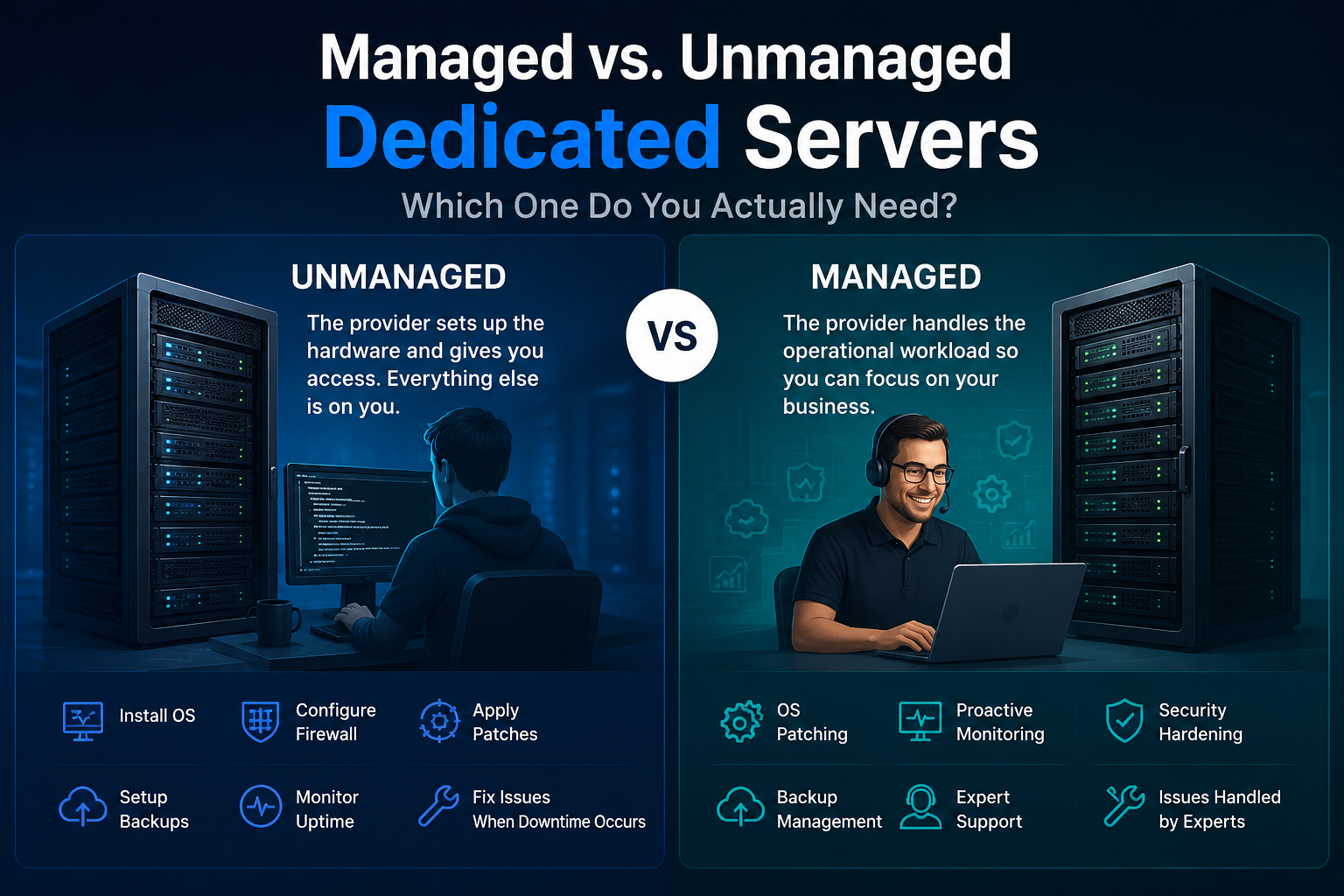
This is the decision that matters more than any spec sheet, so let’s actually dig into it instead of glossing over it.
An unmanaged dedicated server
means the hosting provider racks the hardware, gives you access, and that’s largely where its responsibility ends. Everything else — installing the operating system, configuring the firewall, patching security vulnerabilities, setting up backups, monitoring uptime, and responding when something goes down — is generally on you.
A managed dedicated server
means the provider takes on some or all of that operational workload. Depending on the service tier, that can include OS patching, proactive monitoring, security hardening, backup management, and human technical support when something breaks.
Which Option Is Right for You
Here’s a real scenario to make this concrete.
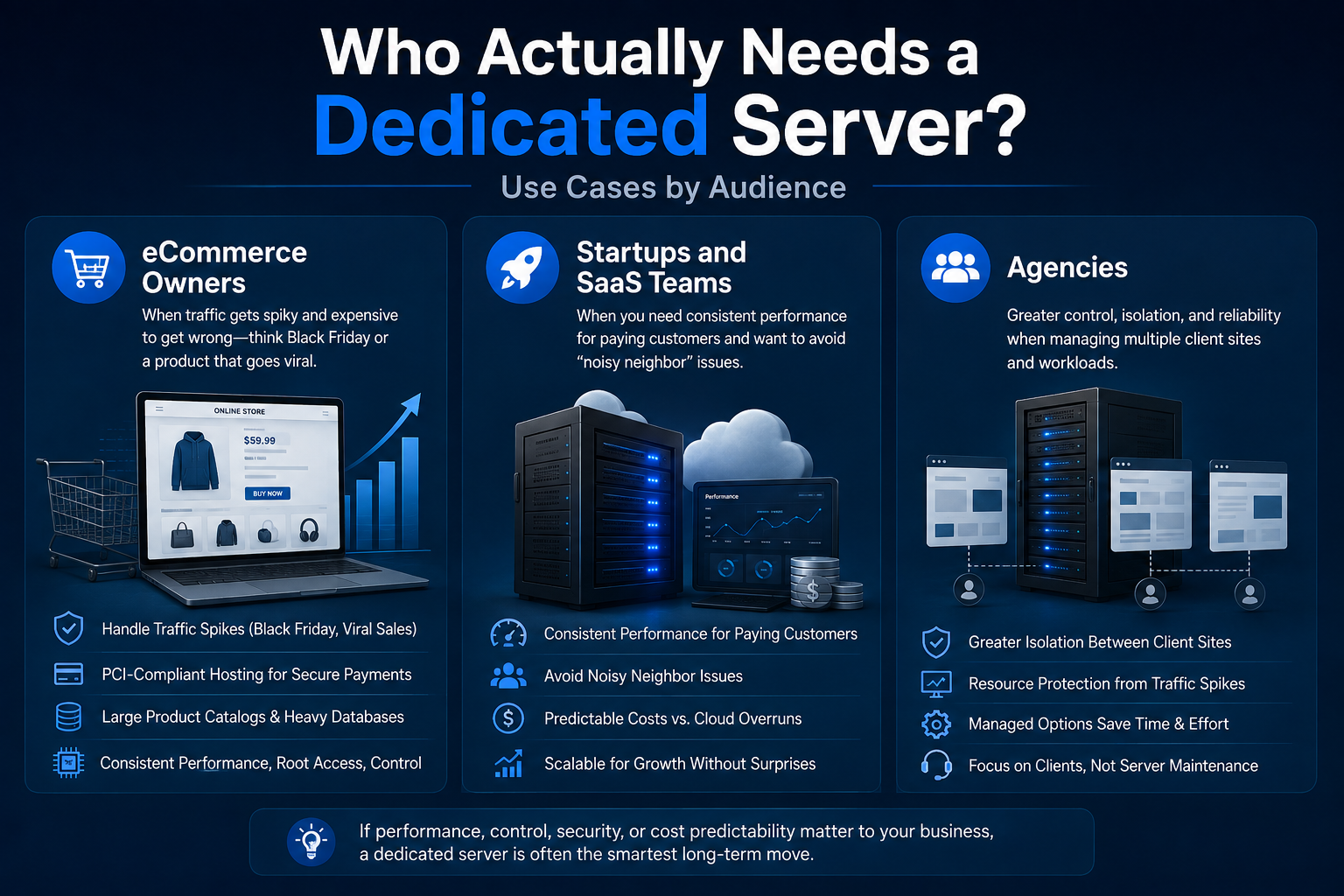
Say you’re a developer who just launched a SaaS product on a dedicated server to get away from noisy-neighbor performance issues on a VPS.
You know Linux, you’re comfortable in a terminal, and you already have monitoring tools you like. Going unmanaged saves you real money every month, and you’re not paying for server management you don’t need.
Now flip it: you’re an agency hosting six client websites on one dedicated server. You’re not a systems administrator — your team does design and WordPress builds. If a kernel vulnerability drops on a Friday night and nobody patches it, that’s not a hypothetical. It can become a compromised client site and a very uncomfortable Monday call.
For you, a managed dedicated server isn’t necessarily a luxury. It’s the service layer that lets your team focus on clients instead of server administration.
Choose unmanaged if:
- You or someone on your team is genuinely comfortable with Linux administration.
- You have, or can build, your own monitoring and alerting setup.
- You want the lowest possible ongoing cost and can absorb the time cost of self-support.
- You’re running a fairly standard, well-understood stack.
- Your team has enough technical knowledge to handle updates, security, backups, and troubleshooting.
Choose managed if:
- Nobody in-house has server administration as their actual job.
- Downtime or a breach would be genuinely costly — lost sales, client trust, or compliance exposure.
- You’d rather pay a predictable monthly fee than an unpredictable emergency one.
- You’re managing infrastructure for clients and can’t afford to be the bottleneck when something breaks.
- You want a hosting provider to take responsibility for routine server maintenance and monitoring.
If you’re still deciding, managed hosting plans can be worth comparing alongside unmanaged options so you can see exactly what the additional management fee provides.There’s no wrong answer here, but there is a wrong way to decide — defaulting to unmanaged because it’s cheaper on paper without being honest about who will actually patch, monitor, and maintain the server six months from now.
Who Actually Needs a Dedicated Server? (Use Cases by Audience)
Click here to find your perfect match and explore our [Enterprise Dedicated Server ]
Our Real Server Experience and Technical Expertise
Choosing a dedicated server is an important decision for any business. At HelloServer, our technical team works with real physical servers and complex network environments every day. We regularly evaluate hardware performance, monitor disk speeds, analyze network and data transfer performance, and troubleshoot server-related issues to help maintain reliable infrastructure.
Our recommendations are informed by hands-on experience with real server environments, not just generic hosting advice. This practical experience helps us provide useful guidance for businesses comparing server configurations, performance, security, and management options.
Honest Advice You Can Trust
Many businesses choose a managed dedicated server because they want dedicated hardware and reliable performance without taking on the full responsibility of server administration. At HelloServer, we believe in providing clear and practical information so users can understand what they are actually paying for.
Our guides focus on real-world considerations such as hardware performance, server management, security, backups, uptime, and total cost. We aim to help businesses make informed hosting decisions based on their actual requirements rather than marketing claims.
How to Choose the Right Dedicated Server Specs
Once you’ve decided you actually need a dedicated server, the next mistake is picking specs by vibes — “let’s just get the biggest one so we don’t have to think about it again.” That’s how businesses end up paying for 256GB of RAM they’ll never touch.
Instead, size your dedicated server against your actual workload:
- CPU cores
matter most for workloads doing heavy processing per request — dynamic page generation, database queries, video transcoding, virtualization, and other compute-intensive tasks. A WordPress or WooCommerce site with moderate traffic may be comfortable on 4–8 cores, while a SaaS application handling real-time processing for hundreds of concurrent users may need a much larger CPU configuration. - RAM
determines how much data you can cache and how many concurrent processes can run without swapping to disk. A database-heavy application can benefit significantly from additional RAM because more working data can remain in memory instead of being repeatedly retrieved from storage. - Storage type
matters more than many buyers realize. HDDs are inexpensive but slow and are generally a poor choice for demanding user-facing workloads. SSDs are a sensible default for most websites, while NVMe storage is worth considering for database-heavy applications and workloads where storage I/O is a major bottleneck. - Bandwidth
requires careful attention to whether it is “guaranteed” or “burstable.” Read the fine print on “unmetered” bandwidth as well. Some hosting providers may impose restrictions or throttling after certain usage levels despite using the term unmetered. - RAID configuration
can provide protection against certain drive failures. RAID 1, which mirrors data across two drives, is a common baseline for workloads where a single drive failure shouldn’t immediately take the site offline. RAID 10 can provide both redundancy and performance for database-heavy environments. RAID is not a complete backup strategy, however, so don’t treat it as one. - Root access
is another important consideration for developers and system administrators. With root access, you have much greater control over
- operating-system settings, software installation, security configuration, and server-level optimization.
A rough rule of thumb:
start with hardware that handles your current peak traffic comfortably, plus around 30–40% headroom for growth, rather than sizing for a traffic level you’re merely hoping to reach in two years.This approach provides room for server scalability without forcing you to pay for large amounts of unused capacity from day one.
The True Cost of a Dedicated Server (Beyond the Sticker Price)
Renewal Pricing and Promotional Rates
This is where a lot of buyers get an unpleasant surprise, so let’s be blunt about it.
The advertised monthly price is almost never the only cost you’ll need to consider. Many hosting providers offer steep first-year discounts and then renew at a higher rate. A plan advertised at $40/month, for example, may renew at $70–90/month after the promotional period. Always check the renewal price before committing, not just the “starting at” number.
Beyond that, watch for:
Additional Setup and IP Costs
Some providers waive setup fees, while others charge them separately. Check whether the fee applies only at signup or also when you upgrade hardware.
Your first IP address may be included, but additional dedicated IPs can cost extra. Only purchase additional addresses when your application genuinely requires them.
Bandwidth and Usage Charges
If your plan isn’t truly unmetered and traffic suddenly spikes, additional bandwidth charges can become an unexpected expense.
Managed Server Costs
This is one of the biggest differences when comparing an unmanaged server with the cost of a managed dedicated server. Depending on the hosting provider and service level, management can add anywhere from tens to more than $100 per month. Read exactly what’s included. “Monitoring” could mean anything from a dashboard to an actual support team responding when something goes wrong.
Backup and Security Costs
Offsite backups, malware scanning, web application firewalls, and advanced security services may be bundled into some plans and charged separately by others.
Uptime Guarantees and Service Levels
Don’t assume that a high uptime percentage automatically means your application is fully protected. Check the provider’s stated uptime guarantee, service-level agreement, exclusions, and compensation terms.
When you’re comparing a dedicated server against a VPS or cloud instance, calculate the total cost of ownership at your actual usage level rather than comparing marketing headline prices.
Dedicated servers tend to become economically attractive when your workload is consistently high and predictable. Cloud infrastructure has a major advantage when you genuinely need elasticity, but if your resource usage stays high throughout the month, you may be paying a premium for flexibility you rarely use.
Security and Setup: What to Do After You Get a Dedicated Server
Getting the server is the easy part. What you do during the first 48 hours can have a major impact on its security.
If you’re going unmanaged, or even using a lighter managed tier, here’s a baseline checklist:
- Disable root login over SSH where appropriate and use key-based authentication instead of passwords. This reduces exposure to automated password-based attacks.
- Configure your firewall to allow only the ports your applications actually require. If you’re not operating a mail server, for example, you don’t need to leave mail-related ports unnecessarily exposed.
- Set up fail2ban or an equivalent tool to automatically block IP addresses after repeated failed authentication attempts.
- Enable two-factor authentication wherever it is supported — control panels, administrative accounts, and other important services.
- Establish a patching cadence. With an unmanaged server, this is entirely your responsibility. Under a managed dedicated server plan, confirm exactly what your hosting provider patches and how quickly security updates are applied after vulnerabilities are disclosed.
- Set up offsite backups, rather than keeping every backup on the same physical machine. If that server fails, local backups can become inaccessible too. Use backup solutions that are stored separately from the primary server and test your restore process regularly.
- Confirm DDoS protection. Some hosting providers include basic mitigation, while others charge separately for advanced DDoS protection services. Ask what type of attack mitigation is included and whether there are traffic limits.
- Monitor server uptime and performance. A reliable monitoring system should alert you when the server, website, database, or critical service becomes unavailable.
Root access gives you significant control, but it also increases your responsibility in an unmanaged environment. Good server management is not simply about installing software; it includes monitoring, updates, security, backups, resource management, and recovery planning.
If you’re in eCommerce or handling sensitive customer data, add a compliance layer to this. PCI-DSS may be relevant if you process payments directly, while GDPR can apply when handling data belonging to individuals in the European Union. Depending on your requirements, you may also need to consider which data center region your hosting provider operates in and where customer data is stored.
Compliance requirements should be confirmed before purchasing infrastructure, not after an audit identifies a problem.
Migrating to a Dedicated Server: What to Expect
Migration is the step that gets glossed over in a single bullet point on most sales pages — “free migration!” — as if it’s a two-minute process. It usually isn’t.
A typical migration to a dedicated server involves:
- Planning your DNS cutover in advance, including lowering your DNS TTL a day or two before the move so the switch can propagate faster once you’re ready.
- Transferring your data — files, databases, email if applicable, configurations, and other required resources — to the new server.
- Staging and testing the website on the new server using a temporary URL or hosts file edit. Test forms, checkout flows, cron jobs, APIs, third-party integrations, and administrative functions before going live.
- Cutting over DNS and monitoring closely for the next 24–48 hours while visitors may still reach different servers during DNS propagation.
The pitfalls that actually bite people include email deliverability problems caused by incorrectly migrated MX records, cron jobs that were never recreated, and third-party integrations that were hardcoded to the old server’s IP address.
When a hosting provider advertises a free migration service, ask specifically what’s included. Does it cover your database and files, or only the operating-system installation? Does the provider handle DNS changes, or is that your responsibility? Does migration include email accounts and configurations?
A straightforward WordPress website might migrate in a few hours. A more complex environment with multiple databases, custom configurations, email services, and third-party integrations can reasonably take a few days when done properly.
Rushing the process to save time is exactly how websites end up with hours of unplanned downtime.
Dedicated Server vs. Cloud/VPS: Making the Final Call
If you’ve read this far and you’re still torn, here’s the honest breakdown — not the version that ends with “so obviously you should buy a dedicated server.”
Factor Dedicated Server Cloud/VPS Performance consistency Excellent — no shared physical resources Good, but can vary depending on infrastructure Cost at sustained high usage Often cheaper Often more expensive Cost at variable/low usage Less efficient — paying for fixed capacity Efficient — pay for what you use Scaling up Requires upgrading or migrating Usually much faster Scaling down Limited by hardware/contract Usually much easier Control and customization Full hardware and OS control Good, with a virtualization layer Setup speed Hours to a day Often minutes Cloud and VPS solutions win when your traffic is unpredictable or seasonal — a flash sale, a viral moment, or a business that genuinely scales up and down throughout the year.
You’re paying for scalability, and if you actually use that flexibility, the additional cost can be worthwhile.
A dedicated server wins when your load is heavy but predictable. If you know roughly what traffic looks like month to month, dedicated hardware can provide consistent performance without paying variable-usage premiums for flexibility you don’t need.
It’s also worth saying that this isn’t always an either/or decision.
Plenty of businesses run a dedicated server for their core, steady application and use cloud infrastructure for burst capacity, CDN services, backups, or disaster recovery. A hybrid infrastructure setup can be a cost-efficient solution once a business is mature enough to need both predictable performance and flexible capacity.
If you’re considering this model, compare your dedicated hardware requirements with available cloud hosting options before making the final decision.
Frequently Asked Questions
What is the difference between a dedicated server and a managed dedicated server?
A dedicated server describes the hardware — a physical machine allocated entirely to you. “Managed” describes the service layer on top of that hardware — whether the hosting provider handles patching, monitoring, security, backups, and technical support, or whether those responsibilities remain with your team. You can have an unmanaged dedicated server or a managed dedicated server; the physical hardware itself doesn’t necessarily change.
How much does a dedicated server cost per month?
Entry-level unmanaged dedicated servers typically start somewhere in the $80–150/month range, while managed options and higher-spec configurations can cost a few hundred to well over a thousand dollars monthly depending on hardware and support requirements. Always check both the introductory price and renewal price before signing up.
Do I need technical skills to manage a dedicated server?
For an unmanaged dedicated server, yes. Comfortable Linux administration and basic server security knowledge are essentially requirements. With a managed dedicated server, you need much less hands-on technical knowledge because the hosting provider handles much of the server management, although understanding the basics is still useful.
Can I upgrade from shared or VPS hosting to a dedicated server later?
Yes. Moving from shared hosting or a VPS to a dedicated server is a common growth path. Most hosting providers offer migration assistance, but you should understand exactly what the migration service includes before assuming the entire process is hands-off.
Is a dedicated server better for site speed and SEO?
It can help, mainly because you’re not competing for physical resources with other customers and you have greater control over server-level optimization. However, site speed depends heavily on configuration, software, caching, database optimization, network performance, and application code. A poorly configured dedicated server can still be slow, while a well-optimized VPS can perform extremely well.
What happens if a dedicated server fails — is there redundancy?
This depends entirely on your architecture. A single dedicated server with no RAID or failover is a single point of failure. RAID can protect against certain drive failures, but it isn’t the same as having a redundant server. Broader redundancy — such as a standby server, load balancing, or disaster-recovery infrastructure — requires deliberate planning and usually additional cost.
Don’t assume redundancy is automatic. Ask your hosting provider exactly what happens if the physical server fails and what level of server uptime protection or recovery support is included.
Final Thoughts
Choosing a dedicated server isn’t about buying the biggest hardware configuration you can afford. It’s about matching your infrastructure to your actual workload, traffic patterns, technical resources, security requirements, and long-term scalability needs.
If your workload is predictable and resource-intensive, dedicated hardware can provide the performance consistency and control you’re looking for. If you need rapid scaling or highly variable capacity, cloud or VPS infrastructure may make more sense. And if your team doesn’t have the time or expertise for ongoing server administration, a managed dedicated server can turn a complex infrastructure responsibility into a predictable monthly service.
Before making a decision, compare the complete cost of ownership rather than the advertised monthly price, check the provider’s uptime guarantee, understand what’s included in server management, and confirm backup, security, migration, and support policies.
Still weighing your options? Start by assessing your current workload and then compare dedicated server plans based on the resources and management level you actually need.
Not sure which setup fits your traffic and team?